Monitor and Audit User Access to Files and Folders in Shares
Share User Access Auditing Program
Audit remote user access to your shared files, folders, and drives with our share monitoring software for Windows networks. The 10-Strike Connection Monitor tool allows you watching who gets info your files in a real-time! The program monitors usage of admin and regular network shares on your PC or a file server and generates alerts when remote users access your shared folders and files. You can also monitor the file changing (not only the file opening), file creation, and file deletion. Find out who deleted a file on a share through the network. Monitor file deletion and access in shares.
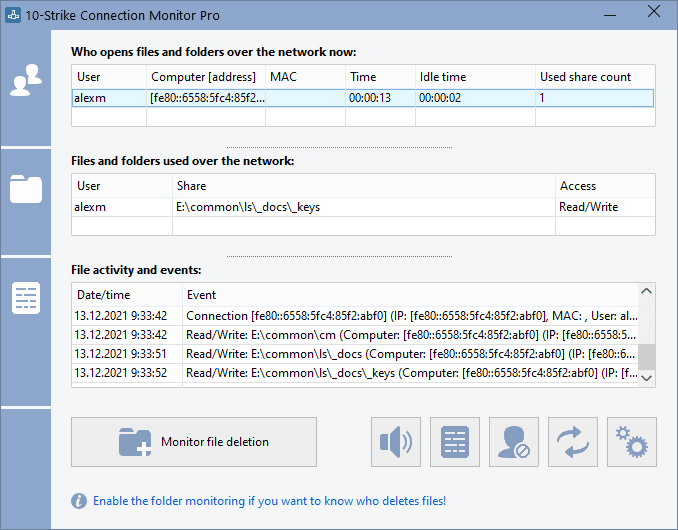
The program generates the screen, sound, and e-mail notifications on connections to shared folders and files, and creates a log file with the information on remote user and computer name, accessed file and folder name, date, type of access, etc. It also allows you to enable and disable access to network shares when necessary using the program's context menu in the system tray.
How to audit remote user access to your shares, files, and folders over the network?
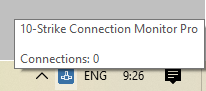 It is easy! Just start the application. After that, it hides into the system tray displaying the program icon with the context menu. With its help, you can watch the current activity on your shares, display the user access logs, configure monitoring alerts with notifications, and stop or start the Server service which provides the network access to your shares via NetBios (SMB).
 The program supports many types of events which can be monitored, recorded to the alert log, and alerted via email, sound, and other notification methods when remote users access your shared folders and files. You can monitor access in one specific folder or share, etc. Learn more about monitoring the access events and alerts...
The Pro version of the 10-Strike Connection Monitor program is implemented as a service. For servers which can work without being logged on, it is better to use the service for the share access auditing than the regular GUI application. Learn more about the Pro version...
Order now and get free one year upgrades and priority e-mail support
Operating systems supported: Windows XP/Vista/7/8.1/10/11, Server 2003/2008/2012/2016/2019/2022
Important notice: the program monitors shares locally. If you want to audit access on a remote server, you need to install the program on it and configure alerts and logs.
With Our Program You Can:

- Monitor Access to Shares, Files, and Folders.
Constantly monitor access to your shared folders, files, printers, and the registry in a real-time. When a new connection occurs, the program will notify you with a sound and a message window in the upper right corner of the screen (or with a balloon tip in the system tray).
- Audit User Access, Monitor Changes in Shared Files and Folders, and Generate Alerts. Configure alerts and receive the screen, sound, and e-mail notifications on connections to a certain shared folder or file. Different types of alerts are supported. Be notified when a connection to a shared folder occurs by a certain user, from a certain computer, or from a computer with certain IP or MAC address.
- Log Access to Shares, Files, and Directories. All connections to your shared folders are recorded to the log file (it stores the following information: connection date and time, remote computer name, remote user name, files and folders opened by remote user, file access type).
- Alert on Suspicious User Activity. Be notified when someone copies a lot of data or opens too many files.
- Monitor File/Folder Changing, Deletion, Creation. Be notified when someone deletes or creates files in an important folder or share. Audit file/folder deletion and creation (everything will be recorded to the log file). Find out who deleted files in a share.
- Monitor User Activity. Be notified when someone accesses an important folder. Monitor a specific user's activity.
- Disconnect users who download large files automatically according to the blacklist settings.
Use Cases for our Share Access Auditing Program
1. For example, you expect your co-worker to write an important file to your share. In this case, you need to configure the "User connection" alert and specify a username in the alert settings. When the desired connection is established, the program will notify you.
2. A server has a share with important files and folders and you would like to audit remote users' access to that share. Create the "Access to share" alert, specify that important folder, and all users accessing the folder will be logged.
3. A server has a share with important files and folders and you would like to know what files and folders were deleted, created, or renamed. Create the "File deletion/creation" alert, specify that important folder, and all file modifications will be logged.
4. A server has a share with important project files your team working with. The normal working process is when your team members work with some part of the files, only with necessary ones. You would not like if some user to copy or scan the entire project folder. You can configure the "Opened files count" alert in this case. When someone decides to copy all the folder, the program will notify you or an administrator about that and you will be able to warn that employee.
New features
1) Added the file filter function. You can define file masks so if someone accesses these files, this activity will not be logged (or alerted). Now you can filter out logging of the user access to temporary files, the printer spooler files, etc.
2) Added ability to install the program remotely on computers using the .msi installation package and Group Policy.
Feedback
If you like this program or if you want us to add some features, we would be glad if you send a message to us. Bug reports will be appreciated too. You can send your feedback to us here.