Configuring the share access logging
If the option Write to file and folder access log is enabled, all attempts of accessing your shares by remote users via network will be recorded to the file that you specify in the field below. The information on disconnected users according to the Black list will be also recorded to the log file.
Every time you start the program, you can either Add new records to the existing log file or Rewrite the log file all over. You can also Break log by days using the corresponding setting.
If you do not want your log file to exceed a specific size, you can set the Log file size limit and specify the maximum file size.
Select Log empty sessions if you want to make records to a log file about all logon sessions (even if no file is opened).
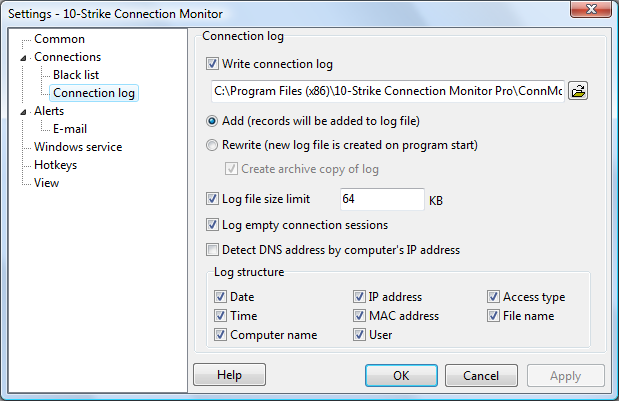
The program can Detect IP addresses and MAC addresses if you enable the corresponging options in the Monitoring section.

Inventory Hardware and Software on Network Computers

Monitor Network Servers, Services, Managed Switches, etc.

Monitor and Manage Network Hosts on a Visual Map, Create Network Maps

Monitor Network Bandwidth and the Internet Traffic Usage

Create Network Diagrams, Discover Network Topology

Search Files on Network Shares and FTP Servers

Audit Remote User Access to Shares (Folders and Files)

Free Program for Scanning Networks, Hosts, and TCP Ports
 Networking Software Bundles