List of Monitoring Checks
 The program can show all monitoring checks in one list allowing you to audit or manage them in one place. Select the main menu item "Monitoring | All Monitoring Checks" (the hotkey F2). The "List of Checks" window will appear (Fig. 1) showing all monitoring checks and some their parameters with status messages.
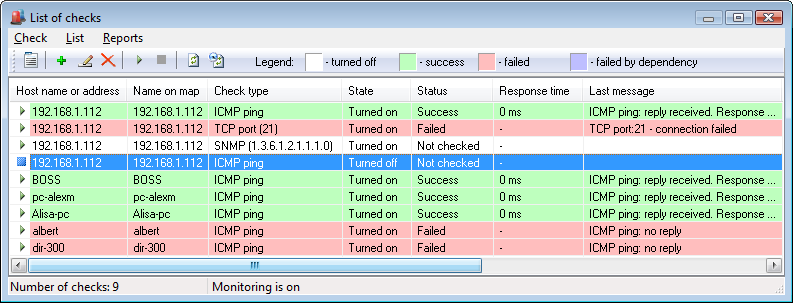
Fig. 1: The Check List window.
On this window, you can add, edit, delete, start, and stop monitoring checks, watch their state and observe the last check results. For your comfort, every line has its own color according to the legend at the top of the window.
If the background monitoring is turned on (see the message at the bottom status line), and autorefresh trigger is also enabled, the information in the list will dynamically change displaying current check results, messages, and time in seconds till the next planned check. You can turn the autorefresh on or off by clicking the menu item "List | Refresh list automatically".
Warning! In order to sort the list items by clicking the column headers or manage multiple monitoring checks simultaneously, the autorefresh option should be disabled. Otherwise, these functions will not work.


 Networking Software Bundles