Memorizing network map
 While modeling the map and once that is completed,
it can be memorized on the maps list (Fig. 1) - not saved to file though - by calling the context menu
Memorize map or Memorize map as... (or by pressing Ctrl+M).
You can navigate through the maps list by selecting the map you need on the drop-down list or using the navigation keys
(similar to Internet Explorer). If a map is not used, you can close it using the button in top-right corner (on the navigation pane).
While modeling the map and once that is completed,
it can be memorized on the maps list (Fig. 1) - not saved to file though - by calling the context menu
Memorize map or Memorize map as... (or by pressing Ctrl+M).
You can navigate through the maps list by selecting the map you need on the drop-down list or using the navigation keys
(similar to Internet Explorer). If a map is not used, you can close it using the button in top-right corner (on the navigation pane).
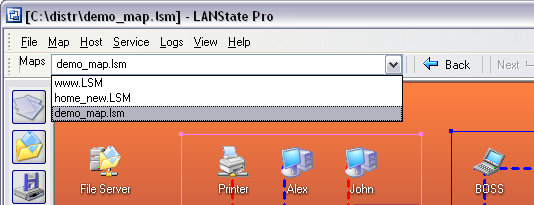
Fig. 1: The list of opened maps.
Subscribe


All products
Network Inventory Explorer
Inventory Hardware and Software on Network Computers
Inventory Hardware and Software on Network Computers
Network Monitor
Monitor Network Servers, Services, Managed Switches, etc.
Monitor Network Servers, Services, Managed Switches, etc.
LANState
Monitor and Manage Network Hosts on a Visual Map, Create Network Maps
Monitor and Manage Network Hosts on a Visual Map, Create Network Maps
Bandwidth Monitor
Monitor Network Bandwidth and the Internet Traffic Usage
Monitor Network Bandwidth and the Internet Traffic Usage
Network Diagram
Create Network Diagrams, Discover Network Topology
Create Network Diagrams, Discover Network Topology
Network File Search
Search Files on Network Shares and FTP Servers
Search Files on Network Shares and FTP Servers
Connection Monitor
Audit Remote User Access to Shares (Folders and Files)
Audit Remote User Access to Shares (Folders and Files)
Network Scanner (NEW!)
Free Program for Scanning Networks, Hosts, and TCP Ports
Free Program for Scanning Networks, Hosts, and TCP Ports
 Networking Software Bundles