Network Monitoring Settings
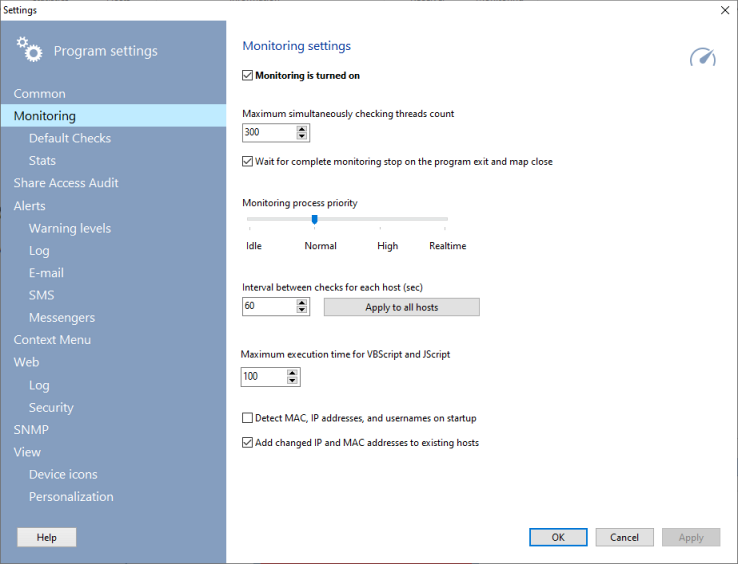
 This section of the program settings configures the process of the network monitoring. The background monitoring is turned on by default for all opened and newly created maps when you select the option Monitoring is turned on. When you disable this option, the monitoring will stop (and will not start automatically when the application is restarted). In this case, you can run the monitoring process manually by clicking the "Monitoring | Start monitoring the current map's devices" item on the main menu (the hotkey F6).
Monitoring settings include the following parameters:
- Interval between checks for each host (in seconds) - the default period of time for polling devices again. The recommended default value is 60 seconds (1 minute). You can re-configure the checking intervals for all devices by clicking the Apply to all hosts button.
- Maximum checking threads count - the amount of the program threads polling devices simultaneously. Avoid increasing this parameter too much. This can slow down your computer. If the thread count is very low and your have a big number of checks, this can increase the interval between two checks for a device.
- Process priority - priority of the background ping process. The recommended value is Normal.
- Wait for complete monitoring stop on the program exit - if you disable this setting, the program will be closed faster on exit. However, some system resources might not become free. Disable this option only if the program finishing lasts too long while it is waiting for closing of all the running monitoring threads and preventing the system from a prompt shutdown.
- Maximum execution time for VBScript and JScript - the script execution timeout. It allows you to limit the VB/JS script execution time in the program. Some scripts can be executing for a long time and the default 5-second timeout will be not enough for "heavy" scripts. You can provide more time to scripts using this setting. For example, a VBScript is used in the Folder size check. If you enable the Consider files in sub-folders option, the script can run longer than a minute recursively counting size of a big folder (like ?:\Windows). If the script timeout exceeds, the check will be considered as failed by a error. This setting affects the execution of all scripts in the program. Use this parameter carefully and avoid setting long timeouts without need because monitoring checks can be performed very slowly in case when network requests are timed out.
- Detect MAC, IP addresses, und usernames on startup - this setting runs a background process of detecting addresses of all mapped devices when the program is starting. This can be useful when DHCP is used on the network.
- If you also enable the Add changed IP and MAC addresses to existing hosts setting, the program will record the address changes to the each host's history.


 Networking Software Bundles