Remote System Information
 The System Information window displays
various data on the remote computer/host:
The System Information window displays
various data on the remote computer/host:
- General Information
- Shares
- Connections (Users connected to shares)
- User Accounts
- User Groups
- Registry
- Services and Devices
- Opened Ports (TCP and UDP)
- Active Tasks (Processes)
- Event Log
- Installed Software
- SNMP Information
You can save all or a part of the data to the Information report (HTML, CSV, or XML file). Click the toolbar icon, or select "Information report" in the object's context menu.
If the current user does not have the administrator rights on the remote computer, the user will not be able to view/edit the remote registry, view the event log, retrieve the list of installed programs, etc. If you know the remote administartor's username and password, you can connect to the remote computer using this account. To do this, click the Connect button (see Fig. 1) or select the "Service | Connect with login and password..." item in the menu.
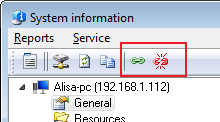
Fig. 1: The Connect and Disconnect buttons on the System Information window.
Fill in the remote administrator's username and password in the displayed window and click OK. If the connection is successful, the program will display the corresponding message. Otherwise, a error message will be displayed. After getting all the necessary information from the remote machine, click the Disconnect button (or select the "Service | Disconnect" item in the menu). You need to disconnect manually for the security reasons so other programs could not use that connection with administartor rights after your session.


 Networking Software Bundles