 Subscribe to RSS feed with 10-Strike Network Diagram updates
Version 3.9, April 2023
- Added the IP camera search using the ONVIF protocol, the CCTV camera RTSP URL detection, and placing the found cameras on the network diagram with recording the RTSP URLs to the device properties (comments).
- Added the ability to quickly select all indicators and text areas on the diagram.
- Added searching for the opened map tab and a quick displaying the found one.
- Added displaying of host parameters on an icon tooltip.
- Added exporting the list of network diagram hosts to MS Excel.
- Fixed the icon scaling when the size of the host image is smaller than its size.
Version 3.8, July 2022
- Updated and re-styled device icons in the Main set.
- Added smooth area boundaries.
- Added several new device icons to the Main set.
- Added the ability to quickly pull devices connected to a device icon and arrange them in a circle.
- Updated the network adapter manufacturer database.
- Fixed the host MAC address detection in the network scanner.
- Fixed inaccuracies in the positioning of objects when scaling the map. Icons and lines no longer move out.
- Fixed saving captions of horizontal and vertical lines in graphic files.
- Fixed changing the color of the area border when applying the format on the network map.
Version 3.7, March 2021
- The device type library is now broken down into icon sets. You can create your own set of icons.
- Added a new set of icons "CCTV" for drawing video surveillance network diagrams.
- Now you can add your own information fields to the host properties. This can be done in the "View" section of the program settings.
- Added the ability to automatically create several icons around the necessary device, connected to it with lines. With this feature, you can quickly draw a switch with hosts connected to it.
- Added quick selection of the entire "switch-hosts" bundle to move it to another location on the diagram.
- Added detection of IP cameras and DVR/NVRs when scanning a network if they respond via the RTSP protocol.
- The function of searching for open TCP ports when scanning a network has been improved.
- Added automatic enlargement of fonts and windows when system scaling is enabled.
- Added hotkeys for calling the most used functions.
- Fixed found bugs.
Version 3.6, March 2020
- Added the new spline type of lines (Bezier curves).
- Updated the program look. Improved the menu.
- Added ability to create hyperlinks on the diagram.
- Added printing the host properties card with the host information (addresses, comments, etc.)
- Added ability to lock the host icon layer.
- Improved the program performance for working with custom host icons on the network diagram.
- Improved the copy-paste and scrolling functions when the diagram scale is changed.
- Improved the overlaying object behavior when you click on it.
- Improved the line importing from Visio (with saving all the line properties).
Version 3.5, September 2019
- Added displaying the host parameters (MAC, IP, name) in the icon label.
- Fixed displaying Google maps on the background. Google map was changed to Open Street Map.
- Added the column limitation and improved the table icon alignment algorithm.
- Added ability to split captions of a line to two parts and display them on the line endings instead of the line middle. This enables you to display switch connection ports for hosts.
- Added ability to specify host MAC addresses manually in the Network Scanning Wizard. This helps you to build the network diagram in cases when host MAC addresses cannot be detected automatically.
- Improved the icon importing from Visio templates.
- Updated the network adapter manufacturer database.
- Fixed displaying MAC addresses from the ARP cache received via SNMP.
Version 3.4, September 2018
- Fixed the field text copying in the host description using the Ctrl+C hotkey.
- Fixed the map menu operation in cases when the host properties window was opened.
- Fixed the big A letter typing in the host description. The Shift+A hotkey brought up the alignment dialog.
- Fixed a problem with displaying Google Maps.
- Fixed the window scaling issue in Windows 7 and 8.
Version 3.3, December 2017
- Added the automatic VLAN list discovery for CISCO switches. There is no need to specify the VLAN list using @ in the Community field anymore.
- Added ability to quickly connect several hosts with a switch using lines. Select the hosts on the map, display the switch context menu, and select "Connect selected hosts to this switch."
- Added ability to quickly delete redundant connection lines on the network map. To do this, select a switch, display its context menu, and select "Delete all lines from connected hosts except the main line."
- Added the "Save all" function which saves all opened network maps in the program.
- Fixed the issue with missing labels for vertical and horizontal lines.
- Fixed discovering network printers as switches in some cases.
- Fixed saving and loading polylines.
Version 3.2, July 2017
- Renewed the window design.
- Updated and extended the network device icon database.
- Added ability to edit object hints.
- Added support for all security levels for SNMPv3: authorization (MD5, SHA) and encoding (DES, TripleDES, AES).
- Added the default icon size setting.
- Improved the network topology diagram creation algorithm (the device icon placement part).
- Fixed the diagram file importing from LANState.
- Fixed minor bugs.
Version 3.1, October 2016
- Added a new object type. It is an image. For example, you can add a photo of your server rack to the diagram, etc.
- Added standard network architecture items to the device icon library: routers, hubs, switches, etc. The enhanced icon library is only available when the new program copy is installed and you did not configure your own device database.
- Added the search function to the device icon database.
- Added the automatic network diagram size adjustment for cases when you load background images.
- Added the host exporting to a CSV file.
- Fixed the error when the area border's color could not be set.
- Fixed the error when the area border's line width could not be changed.
- Fixed the UNDO function for the object formatting.
Version 3.0, January 2016
- Adapted the windows' design to Windows 10.
- Added the icon aligning to a grid with configurable spacing.
- Added the fast icon movement closer to a central device. This is a convenient function when you edit a new scanned network map.
- Fixed the map blinking when switching between them.
- Fixed found graphic editor's bugs.
Version 2.9, April 2015
- Improved the line attaching algorithm.
- Fixed the automatic size arrangement for areas without borders.
Version 2.8, December 2014
- Added ability to create broken lines (through adding nodes).
- Added ability to create hyperlinks to documents and web sites. Using these links, you can organize convenient navigation between opened maps.
- Changed the line selection mechanism: when you click on a line, only the line will be selected but not the whole line's area.
- Fixed found bugs.
Version 2.7
- Added ability to change size of selected icons and areas on your diagram.
- Added ability to select a type for a group of devices.
- The program does not require the administrator rights on the first start anymore.
Version 2.6
- Added the LLDP protocol support for more detailed network topology discovery and network diagram creation. This discovery method can be used separately or together with other network scanning methods supported by the program (based on the MAC address table analysis on managed switches).
- Added the SNMP v2c support to the Network Scanning Wizard.
- Added ability to copy the format style from one object and apply it to other objects on the diagram.
- Added ability to draw double links ("rings").
- Added support for MS Visio 2013. Double links can now be exported as well.
- Added ability to import network maps from another our network topology discovery and monitoring program 10-Strike LANState (the .lsm files).
- Improved the network discovery algorithm.
- Fixed the program handing on operations of deletion hosts and lines.
Version 2.5
- The program's graphic engine's performance was greatly improved. You will notice this when working with large network diagrams (1000 objects and more). The scaling, moving objects, and other operations perform much faster now.
- Added the automatic diagram scrolling when you move objects outside the current diagram borders.
- Added the ability to move the entire diargam to the origin (top left corner) quickly.
- Changed the login/password delimiter to "::" for SNMPv3.
- Fixed the program window positioning on the multi-monitor configurations.
Version 2.4
- Added reading MAC address tables from all VLANs on Cisco switches in the Diagram Creation Wizard. To do this, specify the community strings in the following format: community@vlannumber. For example, public@1,public@2,public@100. In this case, the program will gather the information from all the specified VLANs (1, 2, 100). This community string format can be used for reading the VLAN data from Cisco switches only.
- Added using the last configured color, style, and font for new objects added to the diagram.
- Fixed the network map building error caused by wrong host MAC address detection under Windows 7.
- Improved the network topology discovery and the line drawing algorithms.
Version 2.3
- Added ability to change zoom on the current network diagram view. You can also zoom in selected areas.
- Added ability to update the diagram automatically via the network scanning (search for new devices and add them). If it is possible, the new connection lines will be added as well.
- Added importing vector device icons from Microsoft Visio shape sets (.VSS) into the program.
- Increased the loading speed of network diagrams with a large number of objects.
- Added the VLAN support on Cisco switches. Specify the community strings in the following format: community@vlannumber. For example, public@1,public@2,public@100. In this case, the program will gather the information from all the specified VLANs (1, 2, 100). This community string format can be used for reading the VLAN data from Cisco switches only.
- Improved the diagram creation algorithm. "Empty" hubs are removed from the diagram.
- Added ability to count objects of each type ("Service | Statistics").
- Added a setting on how to label connection link: use the port number or the network interface name.
- Added saving the current zoom factor and position to the network diagram file and restoring back on the file opening.
- Added sorting devices by IP addresses during the alignment procedure.
- Added copying host properties to the clipboard.
- Updated the MAC address database.
- Fixed found bugs.
Version 2.2
- Added a new method of scanning network topology: tracing routes. Now you can create the Internet host connectivity diagrams.
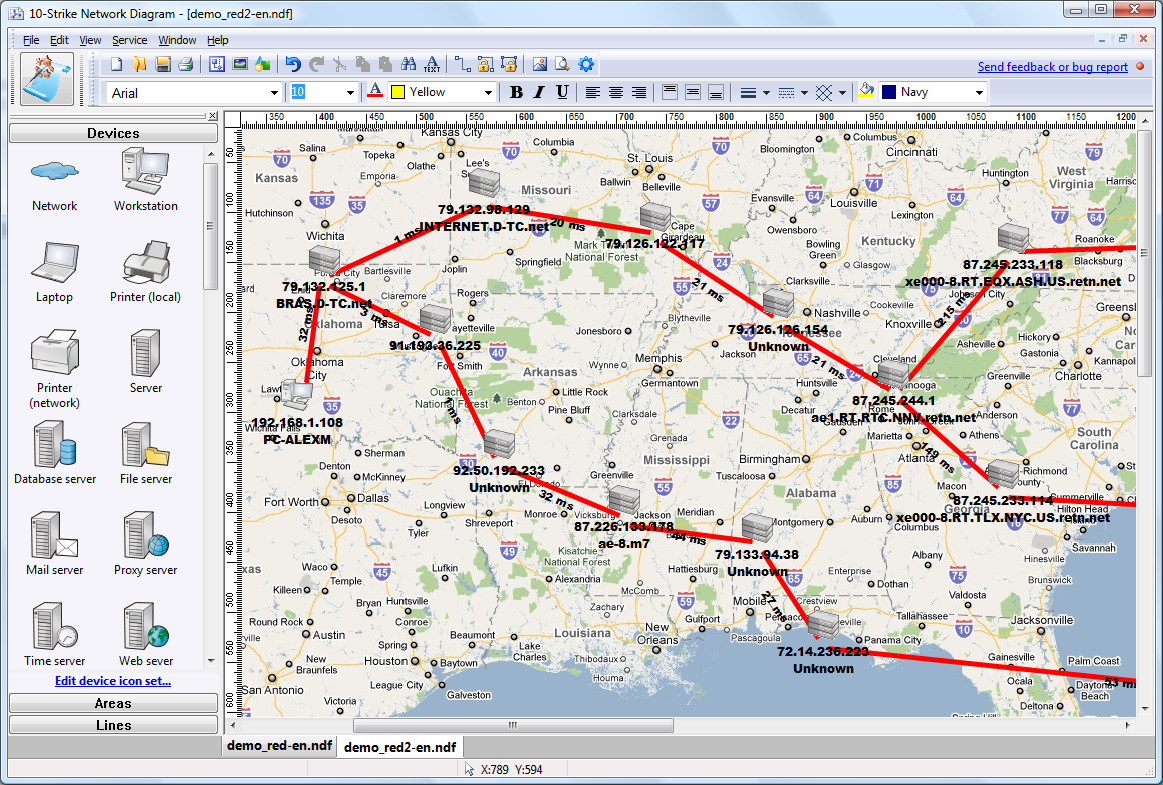
- Improved the network topology discovery and network diagram drawing algorithms.
- Improved the diagram editing functions.
- Added ability to use Google Maps images as a diagram background.
- Added ability to search for objects on network diagrams.
- Added ability to use IP and DNS addresses simultaneously as a host description.
Version 2.1
- Added searching for network devices using the Universal Plug and Play (UPnP) protocol. This function allows discovering routers, wireless devices, media servers and players, and all other UPnP devices on your local network.
- Added SNMPv3 support which allows working with network devices securely.
- Added discovering several new types of SNMP devices (networked printers, firewalls, servers).
- Added the object aligning function: by sides, by center line, in table, in circle.
- Added ability to define area border color.
- Added ability to draw arrows on lines' ends.
- Added ability to move selected objects precisely using your keyboard (hold the CTRL or CTRL+SHIFT keys).
- Added displaying a mini map for better navigation over the network diagram.
- Added displaying the "Description" field from device properties on the screen as a hint when you point the device with a mouse cursor.
- Added ability to hide the grid on the editor window.
- Updated the network adapter manufacturer database.
- Added the scanning log which can help you diagnosing problems with detecting devices on your network.
- Fixed the ping sending error with packets larger than 250 bytes.
- Fixed the Network Scanning Wizard (the IP range detection by network mask).
Version 2.0
- Changed the standard set of bitmap icons to new vector icons. Now you can scale the network device icons without losing image quality.
- Improved the network topology discovery algorithm when scanning a network and detecting device connection links. Added ability to read MAC addresses from VLAN.
- Added ability to create custom device types and edit the existing device icons.
- Added support for background images on network diagrams. You can use the building plan as a background image.
- Added three new types of devices: IP PBX, UPS, and satellite.
- Added exporting the network diagram background image to Visio.
- Added exporting device properties to Visio (IP address, MAC address, Community, etc.)
- Added an alternative line adding method (for connecting devices).
- Added several new line types (including the "communication link").
- Added ability to add text blocks on a diagram (titles, captions, hints, etc.)
- Added changing area and line types using the context menu.
- Added checking the program for updates on our web site.
- Improved the editor usability.
- Improved the network diagram exporting to Visio.
- Updated templates for exporting network diagrams to MS Visio. Visio 2007 does not show the convert message anymore. The program also supports MS Visio 2010.
- Optimized the program GUI to Windows 7 and Vista.
- Fixed all found bugs and errors.
Version 1.2
- Added ability to lock the area and line layers.
- Fixed editing a device's properties on the device icon mouse click.
- Fixed all found bugs and errors.
Version 1.1
- Added detecting some web cameras that support the SNMP protocol.
- Added configuring radiuses when drawing devices around switches and hubs. This helps to avoid device overlapping when creating network diagrams in the automatic mode.
- Improved compatibility with Windows Vista x64.
- Fixed bugs and errors.
Version 1.02
- Bugs fixed.
Version 1.0
- 10-Strike Software announced the release of a new network diagramming and mapping program: 10-Strike Network Diagram 1.0.
The program scans a local network's hosts and switches via the ICMP and SNMP protocols and builds network maps and diagrams semi-automatically.


 Networking Software Bundles