Very often, especially if your network does not have a properly configured DNS and WINS, it may be difficult to view network neighborhood. The scanning network by IP addresses feature allows retrieving the list of all available computers.
You can scan IP range and add new computers to the inventory list by clicking the context menu item "Add computers from IP range" (or the toolbar button "Computers - Add computers from IP range").
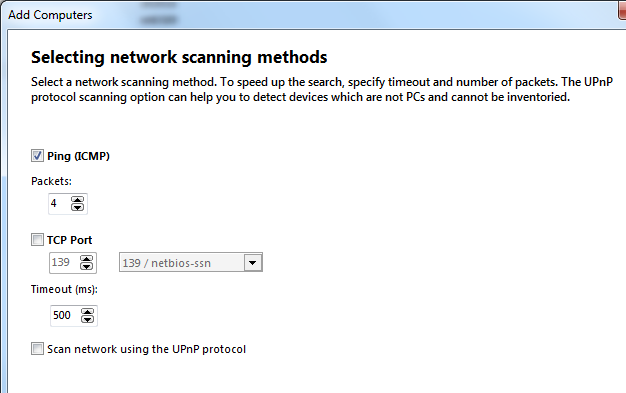
Enter the required fields on the form:
- IP address range - you can specify an address mask or starting and ending address. The program can detect IP address range automatically (click the button "Detect IP range"). The range is read from network settings of the selected network interface on the dropdown list "Interface" (its IP address and subnet mask are used).
- In the field "Scanning method" you can specify, which method should be used for verifying the availability of hosts on the network. That can be the regular Ping or scanning of a TCP-port. If both of these methods are selected, first, hosts will be pinged and then, if the result is negative, the host's TCP port will be scanned.
- Ping - regular ping check (sending ICMP echo packets). Please specify the number of packets to be sent (4 packets by default).
- TCP port - TCP connection check. Please specify the TCP port to be checked (for example, 139 - NetBios).
- Timeout - length of time, within which the program expects response from remote computer.
Click "Next".
The searching process can be cancelled before its completion by clicking the button "Stop".
If the host being scanned does respond, it will be added to the "Found computers" list. Tick the needed computers. All marked computers on the list can be added to the inventory list by using the "Add" button. You can cut off DNS-suffixes before adding hosts to the list (it is useful when DNS names are long).
When the scanning is complete, the window will display the found computers' IP addresses only. You can resolve IP addresses to host names by clicking the button "Resolve IPs". The resolving process can be cancelled by clicking the button "Stop".
You can add found computers in the inventory list by clicking the button "Add".
Warning!
1. The unregistered program cannot add more than three computers to the inventory list (after the 30-day trial period expiration). Please purchase a license key for working with the number of computers you want to inventory.
2. This function is firewall dependent. You must configure your firewall to allow the program to scan TCP ports of other hosts.