Another component, 10-Strike Network Inventory Client (further referred to as "client"), is available for inventorying computers currently disconnected from the network (as well as computers that cannot be accessed with WMI , and for whatsoever reason the polling through agents doesn't go through).
|
The 10-Strike Network Inventory Client files are located inside the "\Program Files\10-Strike Network Inventory Explorer\Client\" folder: |
How to Install and Configure Clients
You need to copy the client files to target computers or to configure the client app starting from a common share on a file server. We will discuss below how to do this better. Fistly, let's learn the client configuration.
Client Configuration
In the NIEClientCFG.exe application, you can configure groups of data to be gathered (the less data you have, the faster the client will complete the job), and select the folder where the data will be stored.
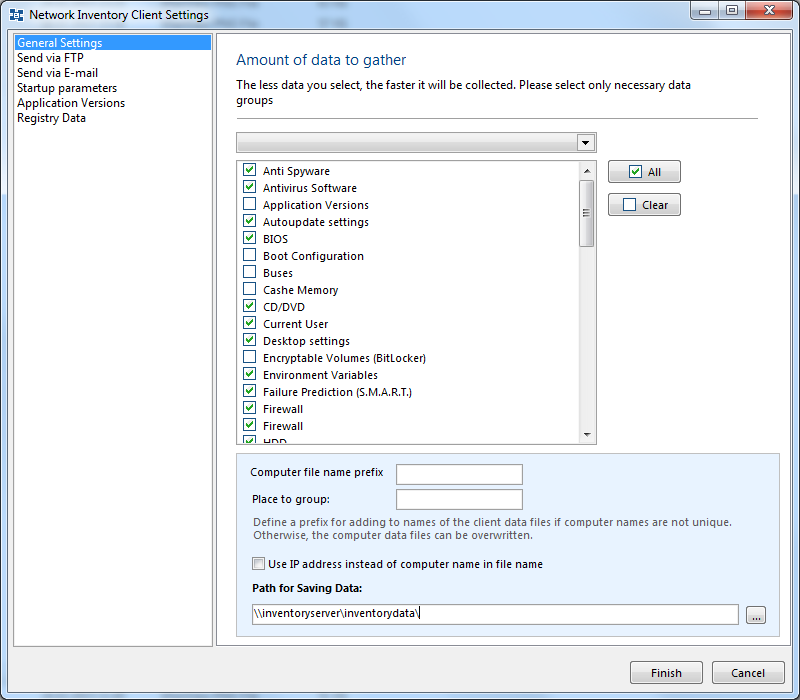
If you place the data folder on the administrator's computer running 10-Strike Network Inventory Explorer or on a public server, you can make the program automatically import the data from the folder on startup. The cfg files are deleted after a successful importing.
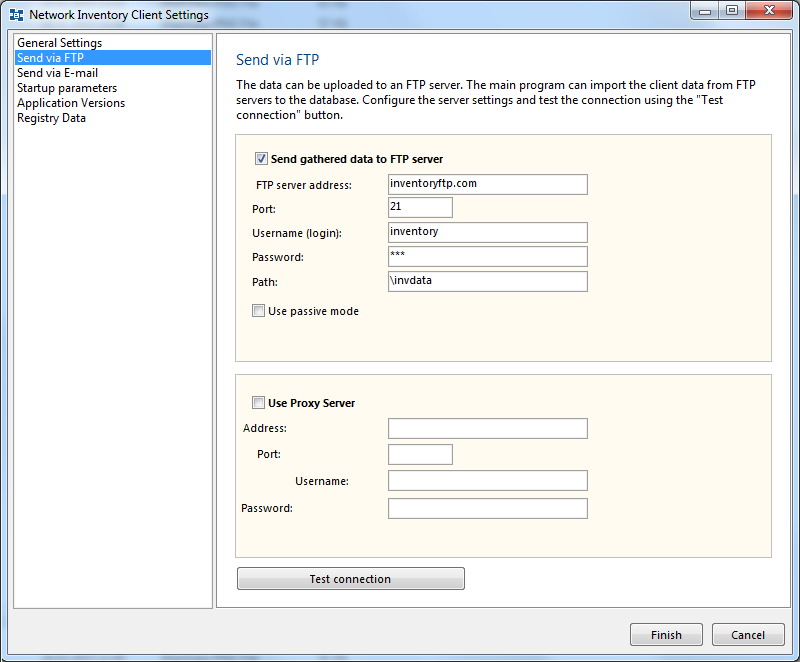
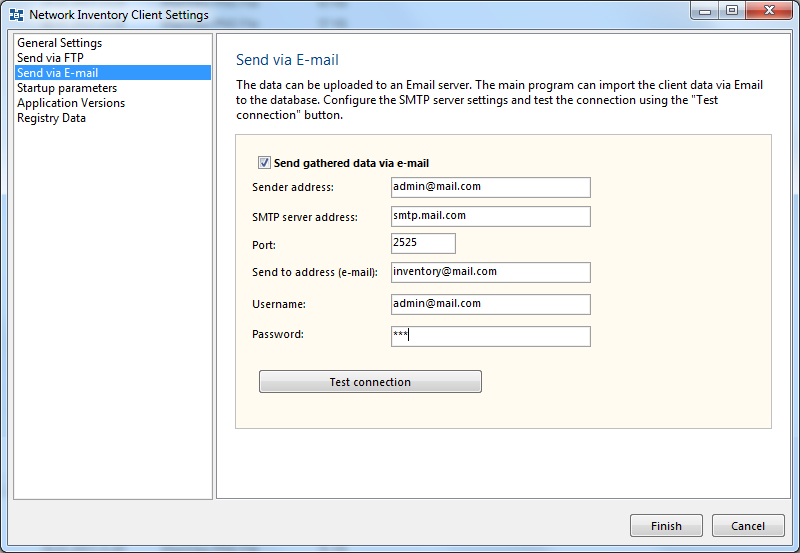
The client application can also upload the cfg files to a FTP server. It also can send the cfg files via e-mail. You can configure FTP and e-mail settings on the second and third tabs.
FTP server settings:
E-mail (SMTP server) settings:
If you do not configure the client, by default, it gathers all groups of data; the data is stored in the "CFG" subfolder of the application's working folder folder.
The configured settings are saved in the "data.cfg" file. You can configure the client once and use this file for running the clients on remote computers. For this, place the "data.cfg" file to the client's folder.
Collecting Data with Clients
To launch a data gathering, run the NIEClient.exe file and wait for the application to complete.
The data collection time depends on a quantity of selected data groups and on the computer's performance. It can take from several seconds to several minutes. A modern computer can collect all the data for half a minute. If your computer belongs to a domain with big number of users and you have selected the "User Accounts" data group, the data collection will take more time.
The result file takes up about 200-300 Kb of disk space. You can make the clients run faster by decreasing the amount of collected data. If you collect only the necessary data, you can decrease the CPU load on users computers by several times.
Installing Clients Locally and Importing Data Manually from Offline Computers
Copy the files with the inventory data to the computer running 10-Strike Network Inventory Explorer. Now, select the menu "Data - Import..." and then select the files you just copied from the computer not connected to network. Wait for the data import routine to complete.
Installing Clients Locally and Importing Data Automatically from Online Computers
With the client application, you can set up the following routine for gathering data from computers connected to network (when using WMI and agents is impossible).
1. On the administrator's PC running 10-Strike Network Inventory Explorer:
a) Create a folder for storing imported data and open the shared access to it from client computers (instead of using the administrator's computer, you can do the same on server).
b) In the program settings, on the "Collection Information" tab:
- Select the checkbox "Import client data from the folder on the program startup".
- Select the folder you have created for the automatic data importing.
2. On the computers to be polled:
a) Install the client application by extracting the content of the installation archive.
b) Run NIEClientCFG.exe and then configure:
- Path for saving data.
- Groups of data to be gathered (the less data you have, the faster the client will complete the job).
- Select the "Launch the client on Windows startup" setting.
You can configure the client settings once and copy the "data.cfg" file to other computers. Thus, you will not have to configure the folder and the groups of data on all computers. But, this will not place the client application to the startup (even if the startup option was selected during the first configuration). To fix this, you need to run NIEClientCFG.exe and click OK.
There is an alternative to manual installing and configuring clients on network computers. You can run clients from a shared folder on a server using logon scripts for this.
Running Client from Share Using Windows Logon Scripts
The method described above has disadvantages. It is hard to change clients' settings and to update the clients on remote computers. If all remote computers are in the network and they can access a public folder on a server, you can configure the computers to run the client from that shared folder. Perform the following steps:
1) Create a folder for collecting a data gathered by clients on a public server. Configure the write-only access permissions for the folder.
2) Run the client configuration program NIEClientCFG.exe. Modify the Path for saving data to the folder created on the Step 1. Select data groups to be collected. Select the"Hide the client window" option and click the Finish button. The configured settings will be saved in the data.cfg file in the application folder.
3) Create a read-only shared folder on the same (or other) server. Place the following files to this folder: data.cfg (from the Step 2), licenses.cfg, NIEClient.exe, and script.cfg. Please check that the folder has only the read-only access permissions for network users. This will prevent the users from modifying the client files.
4) Place a shortcut to the shared file NIEClient.exe into startup folders of all network computers. You can do this by using logon scripts.
Now, you can easily edit the client's settings and update the client application in a single place.
Pros of working with clients:
- Polls computers automatically on boot and startup. Does not require administrator's attendance (when the folder is located on a server) and the running of the main application module when polling. Can "catch" computers running rarely, dump data from computers not connected to the network.
Cons:
- Elevated load on user computers when starting up. However, it can be reduced by polling selected groups of data only.
- Users can hinder the polling by removing the client application from the automatic startup or by closing the client application window (however, the window can be hidden).
- Fresh information cannot be obtained at any moment on demand.