10-Strike SearchMyDiscs Online Help

Fast search

This mode is available when the tab Disks is active.
It allows finding a disk in the list by its partial name or description.
To start a fast search: press the F7 key on the keyboard or select the Find disk item on the Search menu.
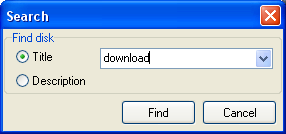
Find fisk window

When the option Title is selected, the search will be performed in disk titles.
When the option Description is selected, the search will be performed in disk descriptions.
Click Find to start disk search.
If the search is successful, the found disk's content will be displayed in the files pane.
Click Cancel to cancel search.


Products:
Network Inventory Explorer
Inventory Hardware and Software on Network Computers

LANState
Monitor Network Servers, Create Network Maps and Diagrams

Connection Monitor
Watch Who Gets Into Your Files over Network

Network File Search
Search Files on FTP Servers and Local Network

SearchMyDiscs
Catalog Disks, Create CD/DVD Database, and Search Files

Log-Analyzer
Analyze Your Apache/RAW Log Files

Junk Mail Remover
Remove E-mail Messages on POP3 Server, Save GPRS/EDGE Traffic

Site Map | Privacy Policy | Links
Copyright © 1999-2008, 10-Strike Software