
Konten und Standard-Überwachungsprüfungen
 This section of the program's settings configures
the default settings for the background monitoring. When a new device is added on the map, these default checks will be added and assigned to it (you can add other checks later). Das Programm verwendet the following two default methods for checking whether hosts are available:
This section of the program's settings configures
the default settings for the background monitoring. When a new device is added on the map, these default checks will be added and assigned to it (you can add other checks later). Das Programm verwendet the following two default methods for checking whether hosts are available:
- Sending ICMP ping echo packets (regular ping)
- Connecting to a specified TCP port (for instance, FTP=21) - so called "TCP ping"
- WMI performance checks
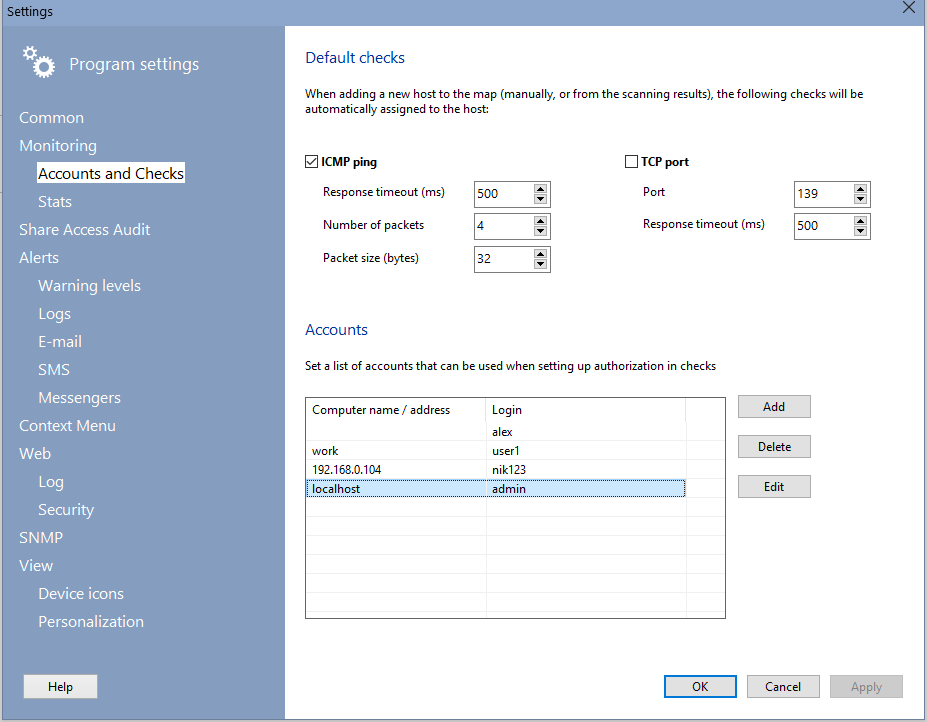
It can use one or several methods simultaneously. In this case, the device will be first pinged with the ICMP ping and then, when no positive result has been received das Programm wird attempt to connect to the specified TCP port, usw.
ICMP ping parameters:
- Response timeout (in milliseconds) - length of time, within which the program expects response from each device.
- Number of packets if the number of packets is greater than one, if the negative response is received for the first packet, the remaining packets will be still sent to the Remote-Host. This eliminates the possibility of false detection of object status when a single packet is lost.
- Packet size size of ICMP packets, in bytes.
Sie können change ICMP ping settings for all devices on map by clicking the button "Apply to all devices".
TCP connection port parameters:
- TCP port (zum Beispiel, 21 for FTP, 80 for HTTP, usw.).
- Response timeout (in milliseconds) - length of time, within which the program expects response from each device.
Sie können change TCP port settings for all devices on map by clicking the button "Apply to all devices".
Since most hosts in modern networks are protected with firewalls, pinging those hosts regularly may not work out (if ICMP echo replies are disabled). In such cases, checking by opening a TCP connection to a specific port of the host may help out. Zum Beispiel, it is common for local area networks to set up FTP services on users' computers. In this case, we can check availability of hosts by attempting to connect to their TCP port 21 (FTP) or port 139 (NetBios).
WMI performance checks available as default checks:
- CPU load
- Memory usage
- Disk load
- Free space on disks
On that screen, you can also configure the list of accounts (usernames and passwords) for quick substitution of them into the authorization fields when configuring the verification parameters. Authorization fields are filled in automatically when creating a new check if the host address in it matches the address specified in the list of accounts. In addition to automatic substitution, you can manually select an account from the Dropdown-Liste.


