Getting Hostname by IP Address

To retrieve a device's hostname: enter the device's IP address to the corresponding field (Abb. 1) and click Retrieve.

This operation takes some time; you should allow 10 to 30 seconds for it to complete, depending on network's performance and configuration. If your DNS is configured fine, it will take a fraction of a second. The indicator in the upper right corner informs when the program is ready (green) or busy (red).

Once hostname is available, you can find it on the Netzwerkkarte (klicken Sie auf button Show).
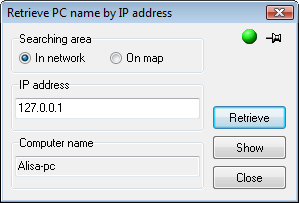
Getting host name by IP address

Sie können search for device on the map if you are sure it exists there: set the switch Searching area to the position On map.


Verwandte Links:

Alle Produkte
Netzwerkinventar-Programm
Network Inventory Explorer
Hardware und Software auf Netzwerkcomputern inventarisieren
Netzwerküberwachungsprogramm
Network Monitor
Server, Dienste, Managed Switches und mehr überwachen
Visueller Netzwerkmapper und Monitor
LANState
Hosts auf einer visuellen Karte überwachen und verwalten, Netzwerkkarten erstellen
Bandbreitenüberwachungsprogramm
Bandwidth Monitor
Netzwerkbandbreite und Internet-Traffic-Nutzung überwachen
Netzwerkdiagramm-Programm
Network Diagram
Netzwerkdiagramme erstellen, Netzwerktopologie erkennen
Dateisuchprogramm für Netzwerkfreigaben und FTP
Network File Search
Dateien auf Netzwerkfreigaben und FTP-Servern suchen
Programm zur Überwachung von Freigabezugriffen
Connection Monitor
Remote-Benutzerzugriff auf Freigaben (Ordner und Dateien) auditieren
Kostenloser Portscanner
Network Scanner (FREE!)
Kostenloses Programm zum Scannen von Netzwerken, Hosts und TCP-Ports