
Netzwerkkarten-Einstellungen
 Das Programm stores the current map's visual settings in its map file. To open the Visual Map Settings window (Abb. 1), select the Hauptmenü's item "View | Visual map settings".
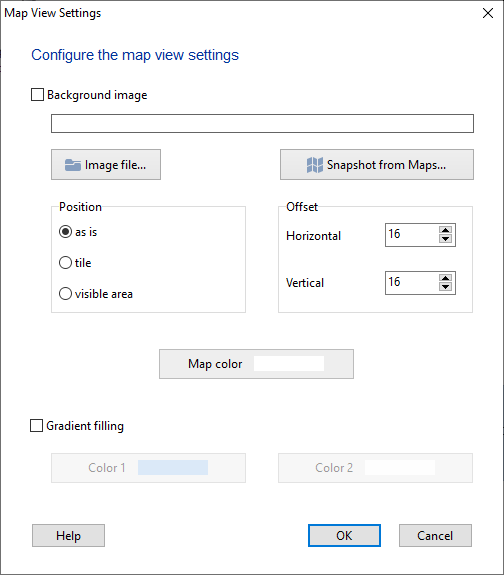
Here you can change the current map's appearance settings:
- Set a background color
- Enable the gradient filling (you should specify the window's top and bottom colors; the background color will be set automatically by finding the average color)
- Add a background image: Sie können draw the building plan in any graphics editor, save the image to a file, and use it as a wallpaper for your map. When using this option, the gradient background option will be unavailable
To add a background image to your map for a better look:
1) Enable the Background image option and klicken Sie auf Image file... button.
2) Wählen Sie Position option. For room plans, we recommend the as is option. For logos - tile or visible area.
3) In the Offset section, configure margins for the top and left map borders. The default value is 16 pixels to avoid the image being drawn over the scroll bars.
Click OK to save the changes.
Sie können use images saved from maps as background images. To import a map image, klicken Sie auf Snapshot from Maps... button. On the dialog displayed, select a map type (map, satellite, usw.), configure the map size (the final image's size) and the scale factor.
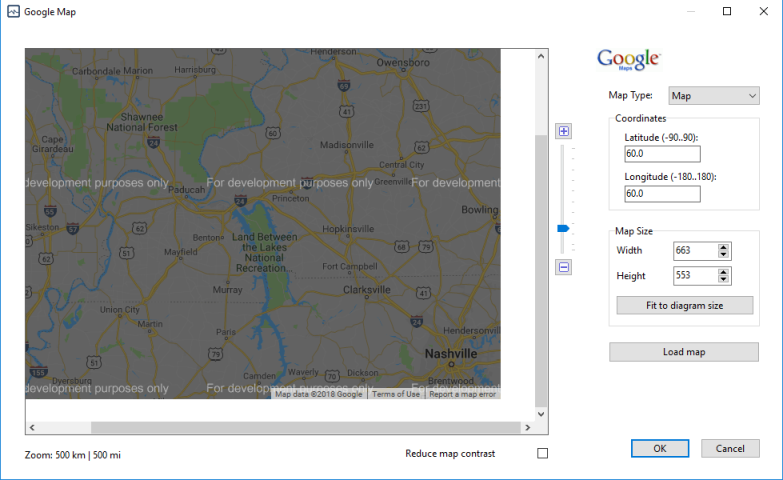
The scale parameter can be configured using the control to the right of the map with help of a mouse pointer. Or you can make double clicks on the map. The left mouse button zooms the map in, the right button zooms out.
The coordinates options help you to quickly display a necessary location on the map. The map size can be adjusted automatically to your network diagram size by clicking the Fit to diagram size button.
After changing the Map size and Coordinates parameters, you need to klicken Sie auf Load map button to refresh the map view.
After adjusting all the options, press the Save map as background button. Das Programm wird create an image file with the map view and link this file to your current network diagram.
The background image will be exported to Visio and printed as well when you perform these operations.


