
Remote Event Log
 This feature ermöglicht Ihnen, access and watch the Ereignisprotokoll on a Remote-Computer (Abb. 1). The system, application, and security logs are available (if you have Administratorrechte on that PC).
If das Programm kannnot read the Ereignisprotokoll (and you have all necesary rights for this), please read this solution in our FAQ: Das Programm kannnot get the list of running services, processes, and installed software from a remote PC.
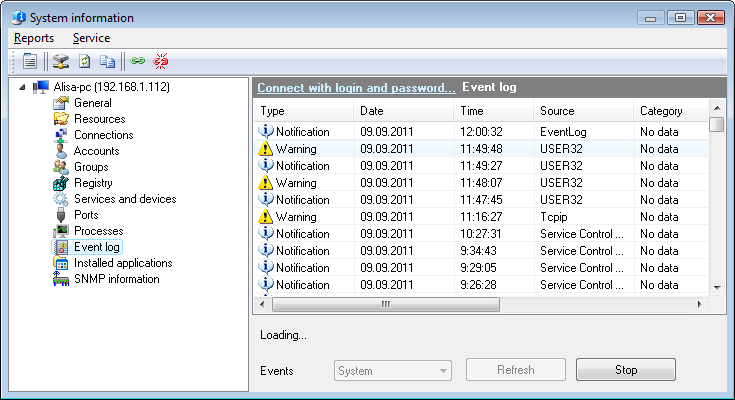
Abb. 1: The Remote Event Log window.
Sie können read the detailed information on event records (errors, notifications, warnings) by double clicking on a record in the list. After doing this, you will see the Event window (Abb. 2). Use the navigation arrow buttons for moving to previous or next log record (you can use the keys Space and BackSpace instead).
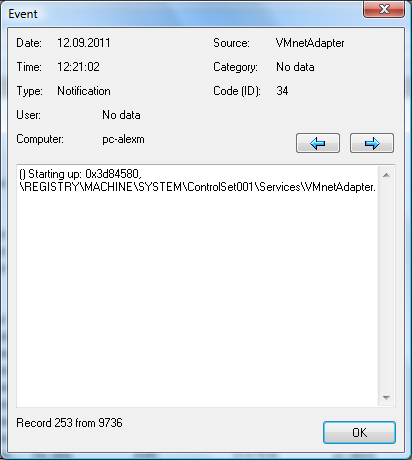
Abb. 2: The Event window.
Sie können copy the data you have retrieved to the clipboard and then paste it to any text file or Microsoft Excel sheet. Klicken Sie dazu mit der rechten Maustaste on the service list and then select In Zwischenablage kopieren on the menu that appears.


