
Remote-Dienste und -Geräte anzeigen - 10-Strike LANState
 Das Programm allows getting
the list of services and devices from a Remote-Computer. Sie können display services of necessary types by selecting the type
you need in the Type Dropdown-Liste (Abb. 1). Also you can display active/inactive services
(using Dropdown-Liste State).
Das Programm allows getting
the list of services and devices from a Remote-Computer. Sie können display services of necessary types by selecting the type
you need in the Type Dropdown-Liste (Abb. 1). Also you can display active/inactive services
(using Dropdown-Liste State).
If das Programm kannnot get the remote service list (and you have all necessary rights for this), please read this solution in our FAQ: Das Programm kannnot get the list of running services, processes, and installed software from a remote PC.
If you have the domain administrator privileges, you can start, stop, pause, or restart services on the Remote-Computer. These operations require administrator rights on Remote-Computers. If the current user does not have such rights, you can connect to the Remote-Computer using administrator's credentials. Read here how to do this.
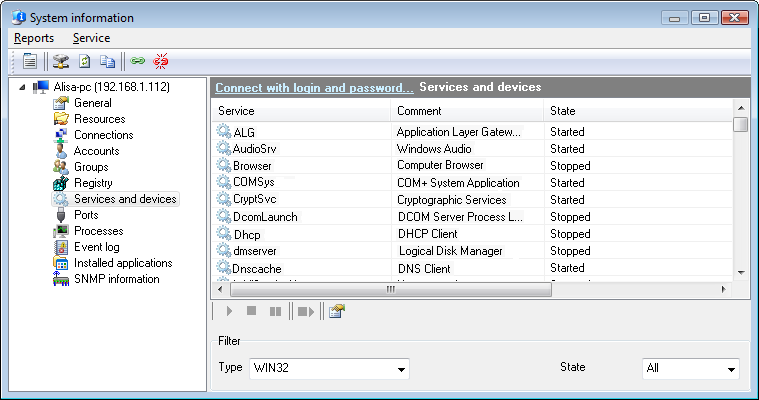
Fig 1. The Remote services and devices Fenster.
Sie können copy the data you have retrieved
to the clipboard and then paste it to any text file or Microsoft Excel sheet. Klicken Sie dazu mit der rechten Maustaste on the service list
and then select In Zwischenablage kopieren on the menu that appears.
Sie können watch additional information on the listed services. To do that, klicken Sie auf Properties menu item in the Kontextmenü. The "Service Properties" window will be displayed (Abb. 2). It shows the service file path, dependent services, the startup type, and the current state of the service. If you have administrator rights on that Remote-Computer, you can edit the startup type of the service.
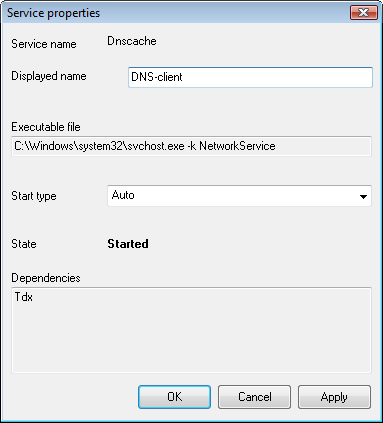
Fig 2. The Remote service Fenster.


