
Task Manager - LANState
Das Programm has its own task scheduler, with which you can perform various scheduled actions: checking hosts, generating and sending reports by e-mail, backing up maps, turning computers on and off over the network. Performing scheduled checks can be useful when there is no need to perform them cyclically after a short period of time. This applies to non-critical parameters of servers and other hosts that do not change as often as others. Zum Beispiel, using the task scheduler, you can check the number of files in a folder for quarterly or monthly reports, which will be launched on a specific day and time.
Checking hosts rarely
The scheduler can perform checks that were previously created in the program. To prevent such checks from being performed periodically along with all others, they need to be disabled. This will not affect the scheduler's check at the planned time. Such a check will be grayed out in the list as disabled, but its status will be updated as it runs.
Um plan a check execution, you need to do the following:
- Create a check for the necessary host. Specify its parameters and configure the notification alerts.
- Disable the check using the Kontextmenü item Disable check.
- Öffnen Sie list of tasks using the program's toolbar menu Monitoring | Task Manager.
- Add a new task using the Add button. On the Task dialog, specify the new task's name, time and frequency of its execution. Wählen Sie Run check item in the Action Dropdown-Liste. Select a necessary check using the [.] button below.
- Save changes by clicking OK.
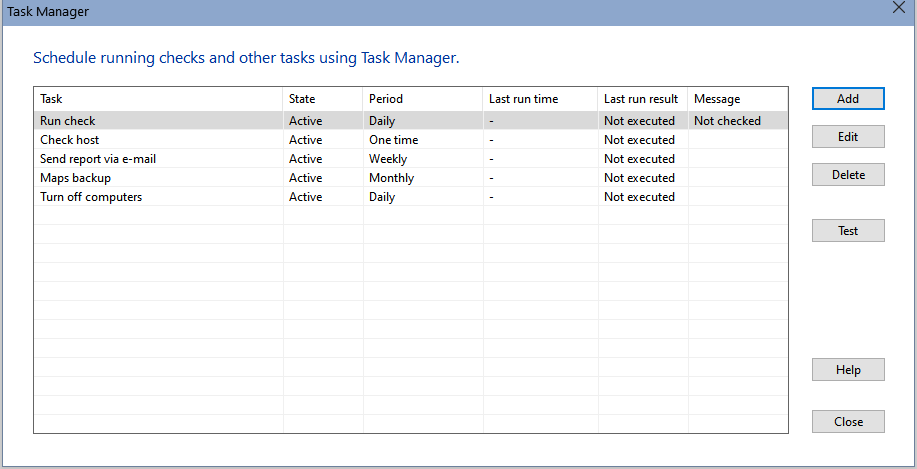
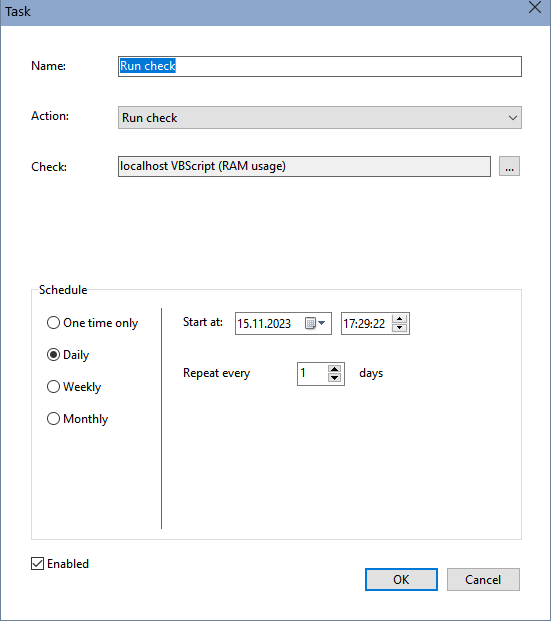
After that, the Task Manager will execute the new task on the specified time and date.
In addition to running individual scans, the scheduler ermöglicht Ihnen, scan hosts against a specified list.
Generating and sending reports
The scheduler ermöglicht Ihnen, create and send several logs by email:
- Failure report
- Host polling statistics report
- Host monitoring report
These reports can be generated both for individual hosts and for hosts of all open maps. In the first case, you need to list the host addresses in a special field separated by commas or semicolons; in the second case, you just need to leave this field empty. In the Period field, you can specify for which period the report should be generated.
The report is saved in CSV format, which can be opened in Excel or imported into any database. In the Send report by e-mail task, the file is attached to the message as an attachment.
Backup maps
Using the task scheduler, you can set up periodic automatic backups of maps opened in the program. They are packaged in a zip archive, the backup copy is saved standardmäßig in the C:\Users\...\Documents\10-Strike\LANState Pro\Bkup\ folder. Sie können limit the number of backups by enabling the appropriate setting.
Turning computers on and off
If the network and computer settings allow you to turn them on and off remotely, then these functions can be performed automatically according to a schedule. To shut down a computer over a network, you may need to be authorized by a user with administrator rights - you can set a login and password for it in the task. Turning on a computer requires compliance with certain conditions (wake-on-lan), which are described in the section Turning on computers over a network.


