Trace-Route-Funktion in 10-Strike LANState

The Trace route function is similar to Windows' tracert command but is more convenient. Sie können specify the following parameters:

  • Number of hops
  • Response timeout

The trace route results and error messages are displayed on the Results window (Abb. 1) and can be displayed on the map by arrows between hosts (Click Show on map to do this).
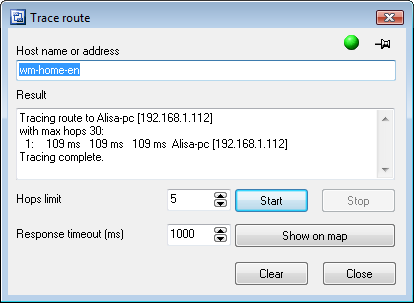
Tracing route
Abb. 1: The Traceroute Fenster.

To perform the route tracing process faster, enable the Do not detect DNS names setting.

The indicator in the upper right corner informs whether the system is ready (green) or busy (red).

arrow The tracing process can be cancelled before its completion by clicking the Stop button.


Verwandte Links:

Alle Produkte
Netzwerkinventar-Programm
Network Inventory Explorer
Hardware und Software auf Netzwerkcomputern inventarisieren
Netzwerküberwachungsprogramm
Network Monitor
Server, Dienste, Managed Switches und mehr überwachen
Visueller Netzwerkmapper und Monitor
LANState
Hosts auf einer visuellen Karte überwachen und verwalten, Netzwerkkarten erstellen
Bandbreitenüberwachungsprogramm
Bandwidth Monitor
Netzwerkbandbreite und Internet-Traffic-Nutzung überwachen
Netzwerkdiagramm-Programm
Network Diagram
Netzwerkdiagramme erstellen, Netzwerktopologie erkennen
Dateisuchprogramm für Netzwerkfreigaben und FTP
Network File Search
Dateien auf Netzwerkfreigaben und FTP-Servern suchen
Programm zur Überwachung von Freigabezugriffen
Connection Monitor
Remote-Benutzerzugriff auf Freigaben (Ordner und Dateien) auditieren
Kostenloser Portscanner
Network Scanner (FREE!)
Kostenloses Programm zum Scannen von Netzwerken, Hosts und TCP-Ports