
 Syslog is a
standard for computer data logging. It is used on computer networks based on the TCP/IP protocol.
Syslog is a
standard for computer data logging. It is used on computer networks based on the TCP/IP protocol.
The Syslog protocol is simple. A sender sends a short message (not longer than 1024 bytes) to a recipient. The message can be sent via the UDP or TCP protocol. Syslog can be used for computer system management and security auditing. It is supported by a wide variety of devices (like printers and routers) and receivers across multiple platforms. Because of this, syslog can be used to integrate log data from many different types of systems into a central repository.
10-Strike Network Monitor can receive Syslog messages and alert a network administrator about them using a variety of methods. To enable the Syslog receiving function, select the "Monitoring | Syslog monitoring " elemento de menú. On the Syslog Monitoring window, you can configure whether the program should Receive all Syslog records or Receive records satisfying filters (and configure these filters). Here, you can also change the Syslog receiving Port. The default Syslog port is UDP 514.
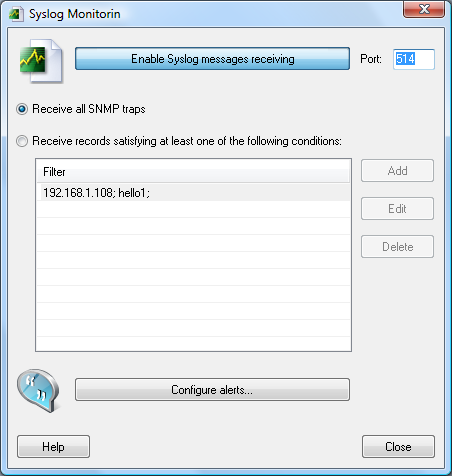
Fig. 1: The Syslog Monitoring window
If there are many devices sending Syslog messages on your network, you can configure a trap filter which will allow you to filter our unnecessary and unimportant messages. To configure a filter, select the Receive records satisfying at least one condition option and click Add.
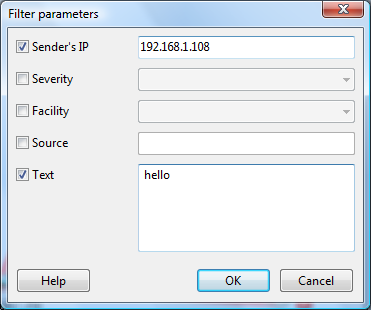
Fig. 2: The Syslog filter parameters window
For example, to receive Syslog records from only one host you can select the Sender's IP address option and define the host's IP address. If you select the Text option the program will search the entered text in each received message and alert you only when the text is contained in the message.
To configure notifications for Syslog records received, haga clic en Configure alerts... button (See Fig. 1).
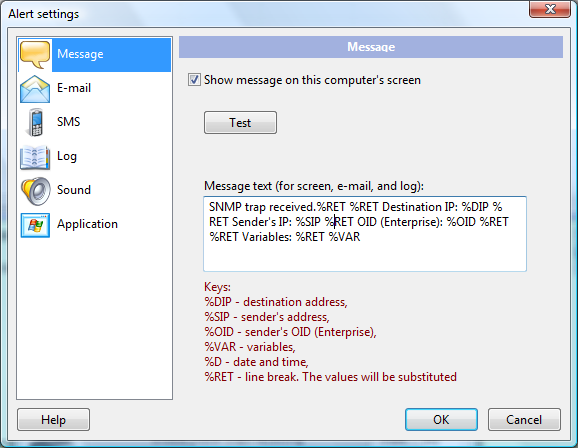
Fig. 3: The Alert settings window
The notification methods are the same as when you are adding and configuring comprobaciones de monitoreo.
After enabling the Syslog receiving and configuring the settings, you can close these windows. The Syslog receiving function will continue operating in the background mode.
 Download 10-Strike Network Monitor - Trial Version
 Pricing | Buy Now
Requisitos: Compatible con Windows XP/Vista/7/8.1/10/11, Server 2003/2008/2012/2016/2019/2022.


