
Share Connection Monitoring - Settings
 In this section of the Programmeinstellungen, you can
configure preferences for the Share Connection Monitoring function. Sie können enable the following options here:
In this section of the Programmeinstellungen, you can
configure preferences for the Share Connection Monitoring function. Sie können enable the following options here:
- Monitor connections constantly
When this item is selected, the share monitoring for active connections will be performed continuously with the time period configured in the corresponding field. - Notify on new connections
When this item is selected, in the upper left corner you will see the notification message displaying a name of computer, which connected to your share (Abb. 1), and a username of that remote user. The message will disappear automatically after the number of seconds, which you have specified in the Display message for... setting.
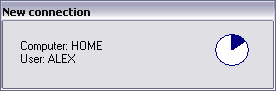
Fig.1: Notification message. - Play sound on new connections
When a new connection is detected, das Programm kann play a sound file (WAV), which you have specified in the Sound file field.


