
Monitoring Local Share Connections
 This screen (Abb. 1) displays information on active
connections to your shares and includes the information on:
This screen (Abb. 1) displays information on active
connections to your shares and includes the information on:
- User
- Computer
- Time
- Number of freigegebene Ressourcen
- Path to selected resource
- Access type
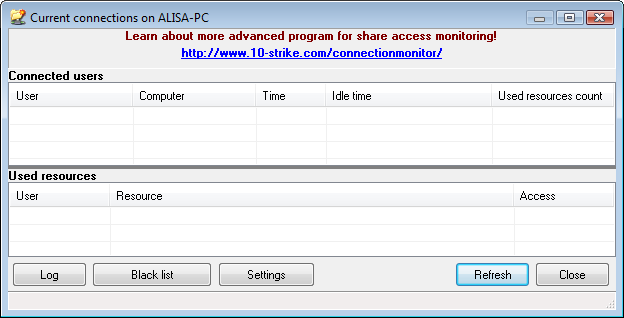
Abb. 1: The Active connections Fenster.
Das Programm kann:
- Monitor connections to your shares constantly in the background mode. Sie können enable or disable the share monitoring and configure settings. When a new connection occurs, you will be notified with a sound and a message window in the upper right corner of the screen.
- Maintain the connection log (see the file Connect.log in the user documents folder\10-Strike\LANState\Logs) if the options Monitor connections
constantly is selected in the program settings and Maintain connection log
is selected in the Connections log settings. All user connections to your shares will be recorded
to the log file. Sie können display it by clicking the Log button on the toolbar (Abb. 1). The Connection Log window will appear. Structure of the information being recorded to the log file can be configured as well.
The log stores the following information:
- Connection date and time;
- Computer name, which accessed your share.
- Disconnect users and terminate their access to your shares manually, using the Kontextmenü.
- Disconnect users automatically according to the blacklist settings.


