
MIB-Browser
 The MIB Browser is the program function (use the menu item Service | MIB Browser to display it) allowing watching the SNMP MIB variables hierarchy in the tree form. Sie können load and compile any standard or custom MIB files.
Usually, network device manufacturers provide MIB files (*.mib) for their devices supporting SNMP. If no MIB file was not provided with your device, you can try searching it on the manufacturer's web site.
A MIB file is a text file containing the information about all SNMP resources (OID) supported by some exact device. The MIB file has a specific hierarchy structure which contains all variables, their purpose, and description. With help of the MIB compiler, multiple MIB files can be combined in a single tree where you can find necessary values (and their names, OID addresses, and descriptions) simpler.
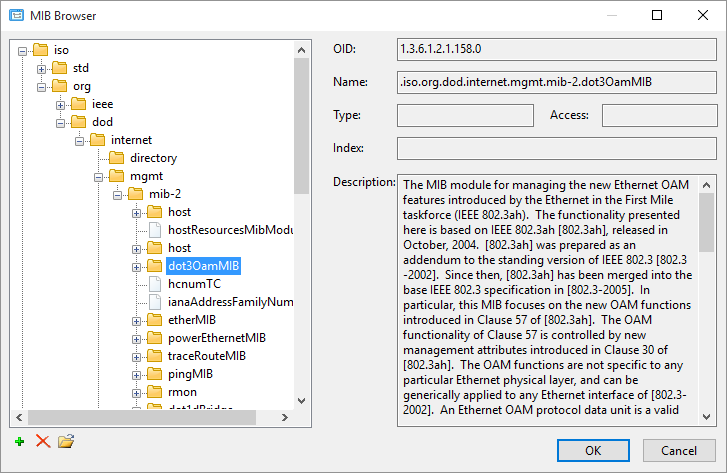
The MIB Browser is used when you select a value to be monitored in the SNMP Überwachungsprüfung, when OIDs are converted to names in SNMP trap messages, or just for watching the available SNMP information in a network device in the program.
Das Programm has several standard MIB files included standardmäßig. They are located in the /mibs sub-folder in the program folder. To add your own files to the common MIB tree, copy them to this folder and restart the program. Or use the Add button under the MIB tree on the MIB Browser Fenster.
In addition to just watching the MIB tree, you can get values of its SNMP variables. To do this, klicken Sie auf Connection settings... button and specify the community string or login/password (for SNMPv3).
After that, you will be able to get a value of the selected tree node (using the GET request) or a value following next (using the GET NEXT request). Use the corresponding buttons for it.
Das Programm kann also save a full SNMP dump from the device to a file (all variables with their values). Use the dropdown menu of the Get button and select Save full SNMP dump in it (you can see this on the above image).
If the MIB files cannot be added to the tree for some reason, please refer to our FAQ topic.


