
SNMP Traps
 This feature is available in LANState Pro only.
An SNMP trap allows a network device to contact the network management when there is a significant event occurred. This is done via unsolicited SNMP messages. Zum Beispiel, if a UPS is out of power, an SNMP trap will be sent to the network administrator's computer with the "Out of power" message. A door sensor can send messages when the door is opened. The SNMP Trap allows an IT manager to be notified when there is a problem so he can respond to it quickly without having to manually check everything to see what and where the error is.
LANState Pro can receive such SNMP messages (SNMP traps) and notify the network administrator about the events using various methods. Zum Aktivieren the SNMP trap receiving function, select the "Monitoring | SNMP Trap Receiver" menu item. On the SNMP trap window, you can configure whether the program should Receive all SNMP traps or Receive SNMP traps satisfying filters (and configure these filters). Here, you can also change the SNMP trap receiving Port. The default SNMP port is UDP 162. Please change it only if you know what you are doing and your devices were previously configured to use the non-standard port number.

Abb. 1: The SNMP Trap window
If there are many devices sending SNMP traps on your network, you can configure a trap filter which will allow you to filter our unnecessary and unimportant messages. To add the trap filter, select the Receive SNMP traps satisfying the filter option and click Add.

Abb. 2: The SNMP Trap filter parameters window
Zum Beispiel, to receive traps from only one host, select the Sender's IP address option and specify the host's IP address. In the same way, you can configure the program to receive SNMP traps sent to your computer only using the Destination IP address option.
An SNMP trap message contains the structured information including the SNMP variable name (OID) and its value. Sie können configure the program to receive SNMP traps with some certain variables only. Add necessary variable names to the list. Sie können außerdem configure the variable type and necessary values (optional settings). After configuring the variable parameters, click Add to add the new set of parameters to the list of variables. After configuring the necessary variables, das Programm wird search for them in all received SNMP traps and notify you the traps contain necessary variables.
Zum Konfigurieren the notification methods for SNMP traps, klicken Sie auf Configure alerts... button below filters on the SNMP Trap window (See Abb. 1).
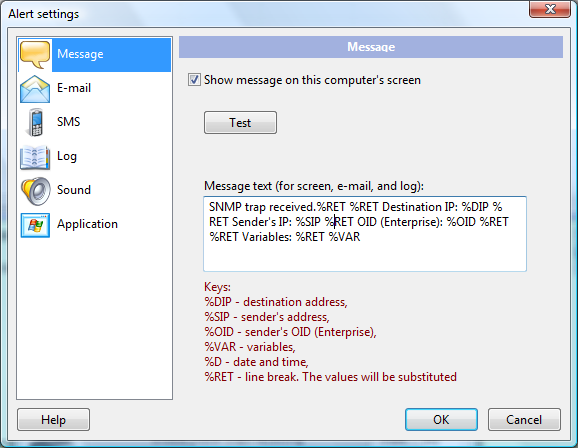
Abb. 3: The Alert settings window
The notification methods are the same as when you add and configure Überwachungsprüfungen.
After enabling the SNMP trap receiving, you can close these windows. Das Programm wird continue receiving SNMP traps and notifying you in the background mode.
Siehe auch: SNMP monitoring.


