Installing and Configuring SNMP in Windows
 Installing the SNMP Service in Windows
To install the SNMP service:
1) Open Windows Components wizard: click Start, click Control Panel, double-click Add or Remove programs, and then click Add/Remove Windows Components.
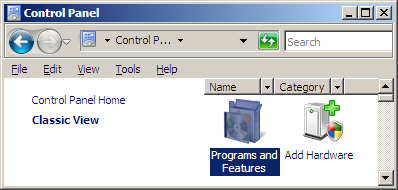
2) In Components, click Management and Monitoring Tools (but do not select or clear its check box), and then click Details.
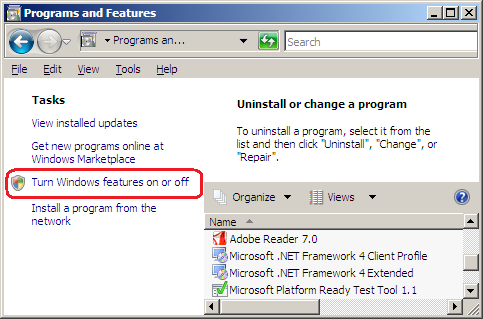
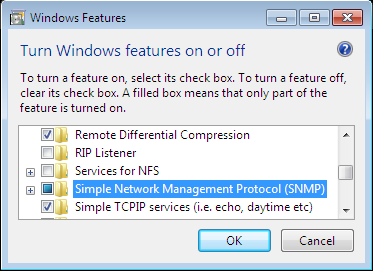
3) Select the Simple Network Management Protocol check box, and click OK.
4) Open the Services window: Select "My Computer", click Manage in the context menu, then Services and Applications, then Services. Find the SNMP Service and check whether it is running. Sometimes, your computer needs to be rebooted after the steps 1-3 in order to run the SNMP service. If you cannot connect to the SNMP service from our or other program, please configure the SNMP security settings (read below).
Important:
Configuring SNMP Security Parameters
To configure SNMP security properties:
1) Open Computer Management: click Start, click Control Panel, double-click Administrative Tools, and then double-click Computer Management.
2) In the console tree, click Services (in Services and Applications/Services).
3) In the details pane, click SNMP Service.
4) On the Action menu, click Properties.
5) On the Security tab, select Send authentication trap if you want a trap message sent whenever authentication fails.
6) Under Accepted community names, click Add.
7) Under Community Rights, select a permission level for this host to process SNMP requests from the selected community.
8) In Community Name, type a case-sensitive community name, and then click Add.
9) Specify whether or not to accept SNMP packets from a host:
- To accept SNMP requests from any host on the network, regardless of identity, click Accept SNMP packets from any host.
- To limit acceptance of SNMP packets, click Accept SNMP packets from these hosts, click Add, type the appropriate host name, IP or IPX address, and then click Add again.
Important:


 Networking Software Bundles