
10-Strike Network Diagram - Software for Creating and Drawing Network Topology Diagrams

Explore your local network's topology, document LAN layout, and create diagrams easily with our network diagrammer program!

10-Strike Network Diagram Screenshots 10-Strike Network Diagram is a powerful network topology discovery software for Windows for the quick creation of a visual diagram and exporting it to Microsoft Visio, vector or raster images. The program scans your local area network, automatically builds a graphical network graph (map), displays computers and devices of different types as special icons, discovers network topology, and draws links between the devices (if your switches support the SNMP protocol).

Create and save network diagrams in popular graphical formats, copy and paste diagrams to documents, print them, or export to Microsoft Visio for further processing.


Use Cases for 10-Strike Network Diagram:


Benefits of Using the Network Diagram Program

10-Strike Network Diagram was awarded by PC Magazine/RE in the <BestSoft 2010> contest


10-Strike Network Diagram was awarded by PC Magazine/RE in the "BestSoft 2010" contest!

Operating systems supported: Windows 2000/XP/2003/Vista/2008/7

Watch the Program's Screenshots...


download network diagram: 30-day trialDownload Free 30-Day Trial Version

order Network DiagramBuy Now! (from $149.95)


Our Clients:


How the Network Diagramer Program Works

10-Strike Network Diagram offers two ways to creating a network topology map.

The first one is automatic diagram creation. According to user-defined IP ranges and scanning methods, the application attempts to locate devices within the network. Available search methods include pinging over ICMP, scanning specified TCP ports, and attempting to convert IP address to MAC (ARP). The application runs several parallel threads for searching for devices within a specified range. Scanning a range of 1500 IP addresses takes no more than 3-4 minutes. The application can also locate devices with active SNMP agents: switches, network printers, routers, etc. Using the data obtained from the switches over SNMP, the application draws graphic connections between the network devices it has found. While doing that, the program will make up a pretty picture of icons and connection lines on the map in the form of graphs. Connections to a switch are labeled with port names of that switch. 10-Strike Network Diagram employs an original sophisticated algorithm for recognizing types of the devices. Thus, the application can recognize networked and local printers, servers, database servers, routers, switches, and hubs.

The second way is manual editing. The software includes a library of objects, graphic primitives, and lines. With simple manipulations, required icons can be placed on a diagram, linked with connection lines, and marked with areas. All the operations are intuitive and do not take much time to complete.

A ready network diagram can be saved as a vector (Windows Metafile) or raster (JPEG, PNG, BMP) image, or exported to a Microsoft Visio document. The program can print the diagram on paper with options for setting the printing quality, position on page, and page orientation.

Learn More about our Network Diagrammer -> "10-Strike Network Diagram: Get the Picture of Your Network"

Learn More about the Network Topology Diagram Creation


The Network Diagrammer Screenshots

Enterprise network diagram example:
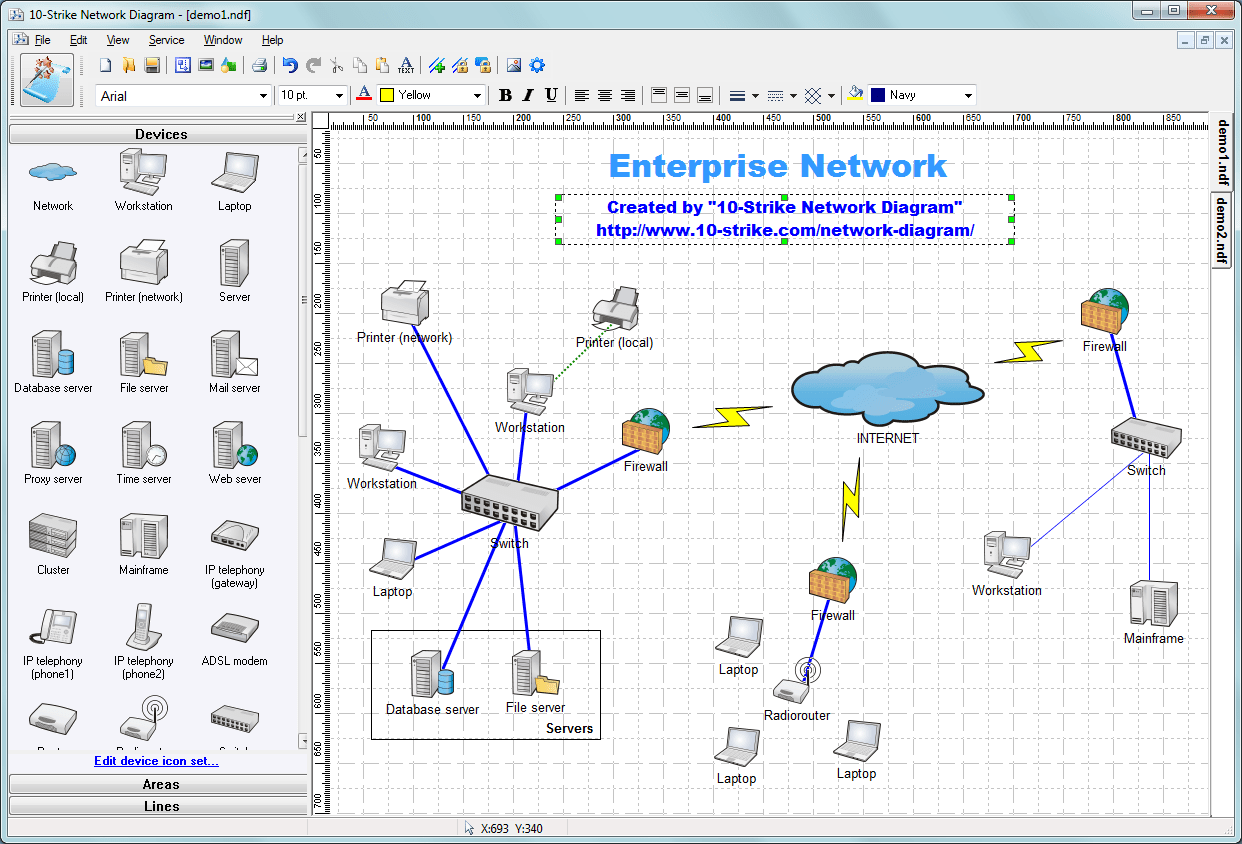
10-Strike Network Diagram Screenshot. Click to open a fullsize image.


Scanning and discovering network topology via SNMP and creating network diagrams:
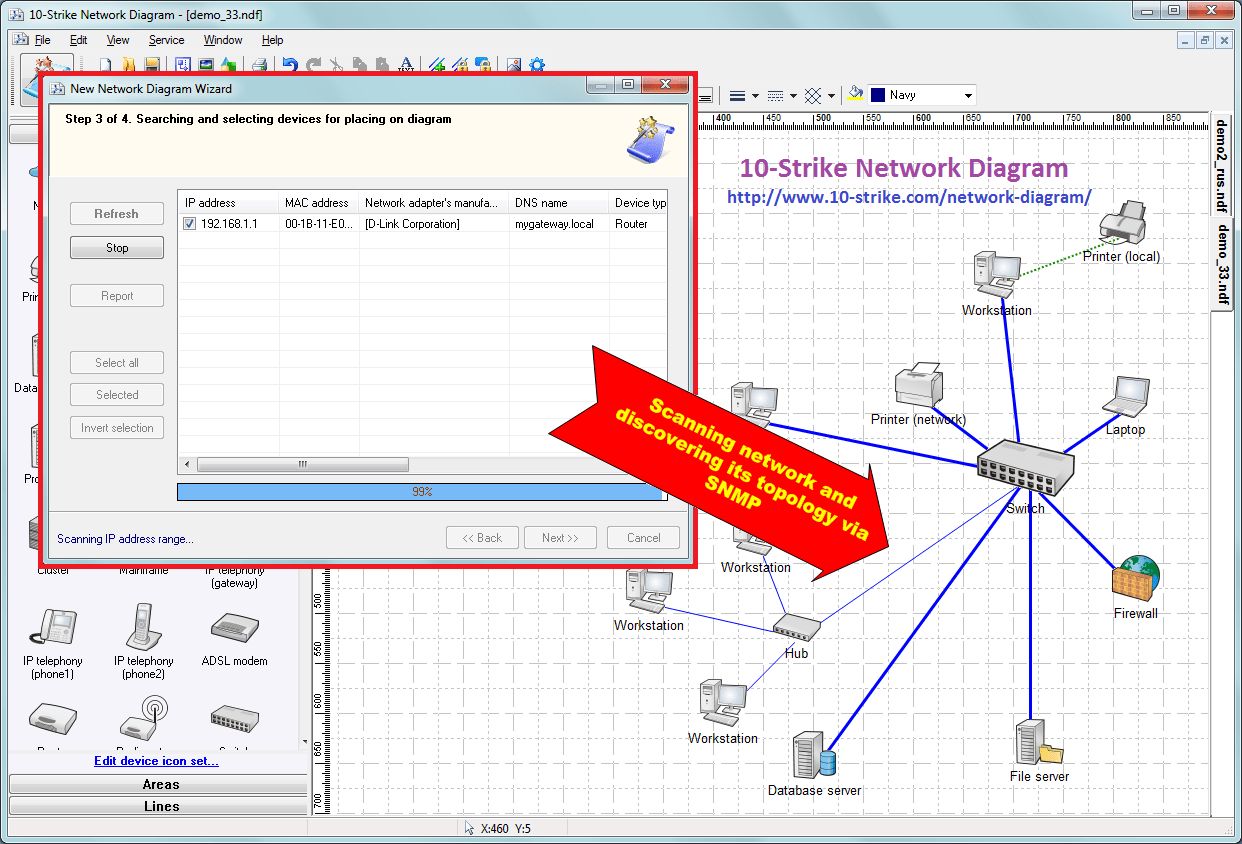
How to create a network diagram. Click to open a fullsize image.


Starting from the version 2.2, the program can create global networks diagrams using route tracing. The program allows you to use Google Maps as background images:
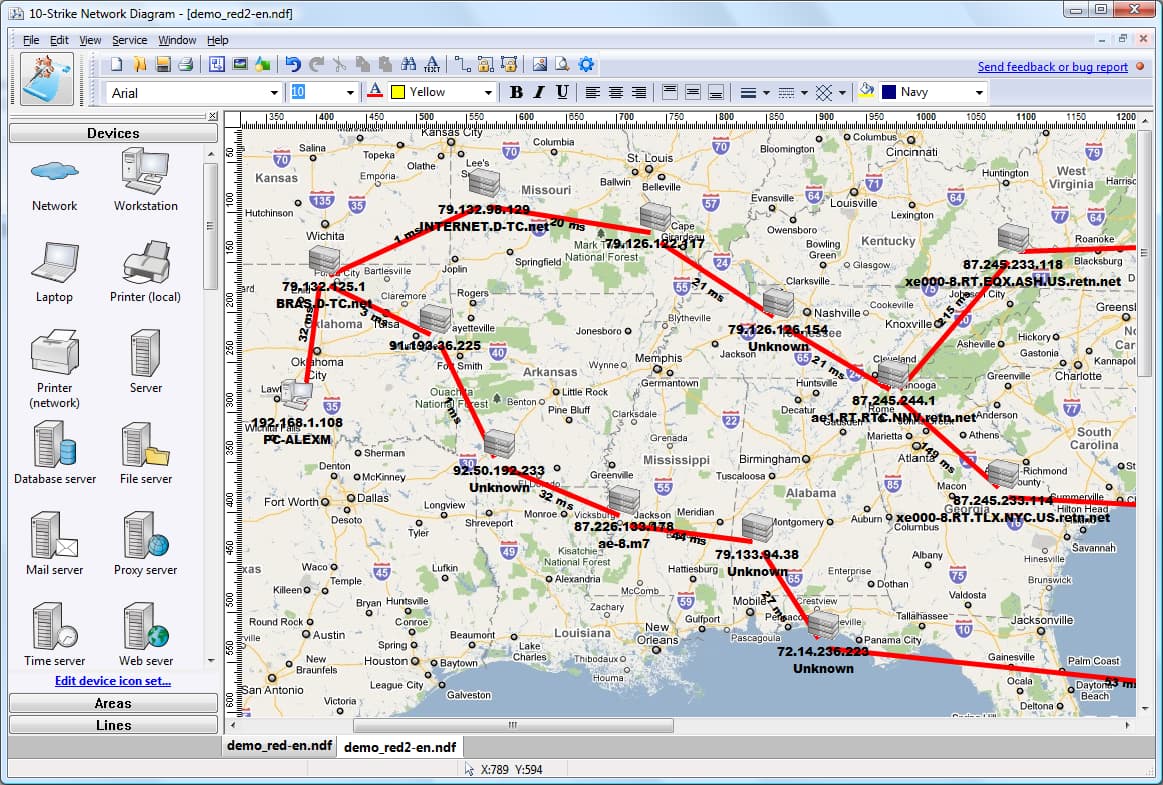
Building a global network diagram. Click to open the fullsize image.

More Screenshots...


download network diagram: 30-day trialDownload Free 30-Day Trial Version

order Network DiagramBuy Now! (from $149.95)


info What else? If you want to monitor hosts placed on your network diagrams, try our network mapping and monitoring program LANState Pro
network diagrammer, mapper, and monitor 10-Strike LANState Pro
This is a network mapping, monitoring, and administration software for Windows networks. In addition to almost the same network diagrammer features as 10-Strike Network Diagram has, LANState Pro contains a network device status monitor that allows you to see the state of network devices on a graphic diagram in the real time, and to receive notifications when your network devices go down or recover. Respond to failures promptly and minimize expenses!

10-Strike Network Diagram has a more powerful graphics engine with vector icons support, but it cannot monitor state of your network devices as 10-Strike LANState Pro can. This is the main difference between these two mapping programs while the network topology discovery engine is the same.

We recommend you to try both programs and see which program suits your needs better. 30-day trials are available for downloading for both applications.


Products:
Network Inventory Explorer
Inventory Hardware and Software on Network Computers

Network Monitor
Monitor Network Hosts, Servers, Switches, and Other Devices

LANState
Monitor Network Servers, Create Visual Network Maps

Bandwidth Monitor
Monitor Network Bandwidth and Traffic Usage

Network Diagram
Create Network Diagrams and Maps Automatically

Network File Search
Search Files on Local Network and FTP Servers

Connection Monitor
Monitor and Audit Access to Your Shared Folders and Files

SearchMyDiscs
Catalog Discs, Create CD/DVD Database, Search Files on Discs

Log-Analyzer
Analyze Your Apache/RAW Log Files

33-60% Discounts in June!
Buy Any Enterprise License for $995.00!
Buy 7 Enterprise Licenses for $3995.00!

We need your clicks here:
Site Map | Privacy Policy | Links
Copyright © 1999-2013, 10-Strike Software