Configuring black list
The "Black list" function allows disconnecting annoying users when they are downloading a huge amount of data slowing down your PC. The blacklist function does not block such users completely from accessing your shares. It allows them to list your folders and open small files, but when they try to download large files (which take several seconds or more for downloading), they will be disconnected.
WARNING! If you need to block some users completely, please use the system share access and security settings.
There are two ways of adding a person to the black list:
1. Select his/her username in the list of current connections, bring up the context menu (right-click) and select "Add to black list" (Fig. 1).
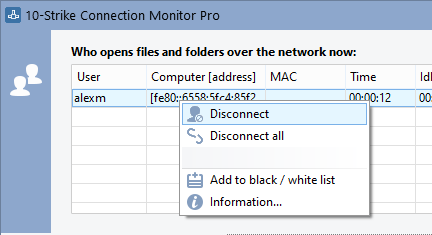
Fig. 1. Adding a user to black list via the context menu.
2. Click the "Black list..." button on the main window and add the necessary user names.
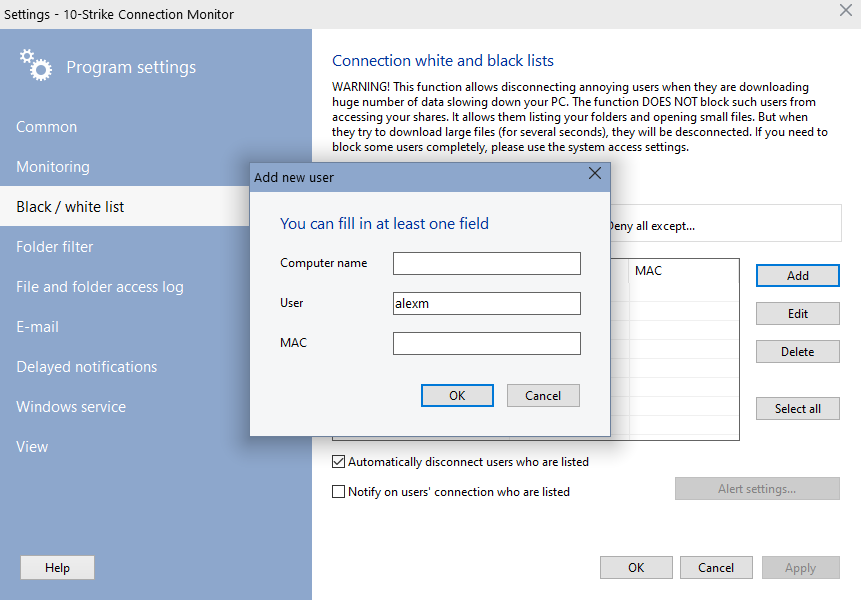
Fig. 2. The "Blacklist" section in the settings window.
Selected users or computers will be disconnected. Non-selected users or computers will not be disconnected.
If you add a user name only, this user will not be able to download files from any PC. If you add a computer name only, no user from this computer will be able to download your files. If you specify both a user and computer names, this user will have no access to your data from that computer only.

Inventory Hardware and Software on Network Computers

Monitor Network Servers, Services, Managed Switches, etc.

Monitor and Manage Network Hosts on a Visual Map, Create Network Maps

Monitor Network Bandwidth and the Internet Traffic Usage

Create Network Diagrams, Discover Network Topology

Search Files on Network Shares and FTP Servers

Audit Remote User Access to Shares (Folders and Files)

Free Program for Scanning Networks, Hosts, and TCP Ports
 Networking Software Bundles