Configuring Share Access Monitoring
In this section of the program settings, you can configure the share access monitoring settings.
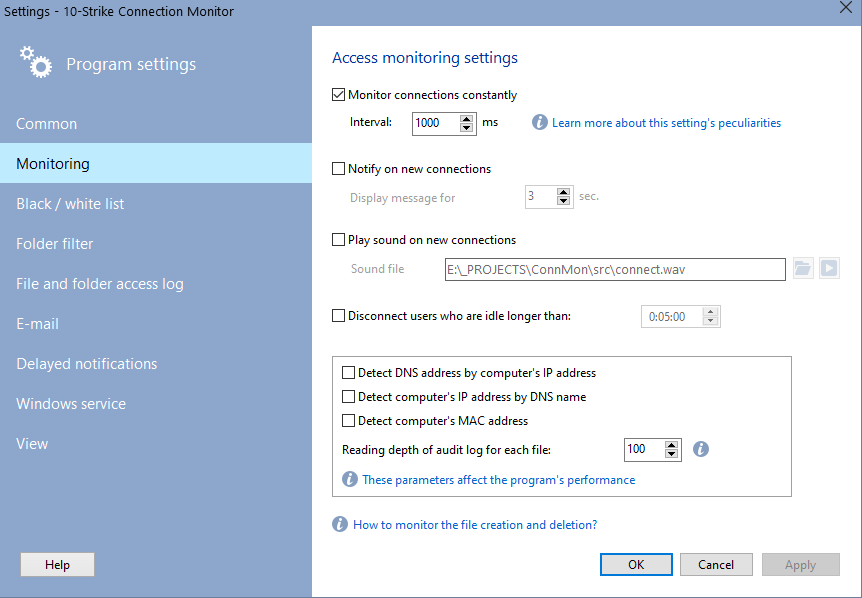
- Monitor connections constantly
When this item is selected, monitoring for active connections will be performed continuously, with the period configured in the corresponding field.
Warning! With a shorter time inteval, the software can log more user connections and react faster when using black list and alerts. But with a very short interval and large number of simultaneously connected users can increase the load on your system's CPU. We recommend the value of 1 sec. for user computers.
- Notify on new connections
When this item is selected, in the upper left corner you will see the notification message with the name of the computer, which your shares are being accessed from, and name of the remote user. The message will disappear automatically after the number of seconds, which you have specified in the Display message for... setting.
- Play sound on new connections
When a new connection is detected, the program can play a sound file (WAV), which you have specified in the Sound file field.
- Disconnect after idle time
It happens often that user, once has opened file shares, does not close the session and remains on the active connections list. That can be critical when the number of such "dead" connections reaches the maximum, and new users can no longer connect to the share. In this case, you can take advantage of the application’s capability to disconnect idle sessions. For that, select the "Disconnect users not using shares..." option and enter the maximum idle time. That will automatically disconnect all users with the number of shares being used equal to 0 after the specified time span. The respective record will be made to the connection log.

Inventory Hardware and Software on Network Computers

Monitor Network Servers, Services, Managed Switches, etc.

Monitor and Manage Network Hosts on a Visual Map, Create Network Maps

Monitor Network Bandwidth and the Internet Traffic Usage

Create Network Diagrams, Discover Network Topology

Search Files on Network Shares and FTP Servers

Audit Remote User Access to Shares (Folders and Files)

Free Program for Scanning Networks, Hosts, and TCP Ports
 Networking Software Bundles