Printing Network Diagram
 To print the map, select File |
Print... on the program's main menu, or click the button on the toolbar.
To print the map, select File |
Print... on the program's main menu, or click the button on the toolbar.
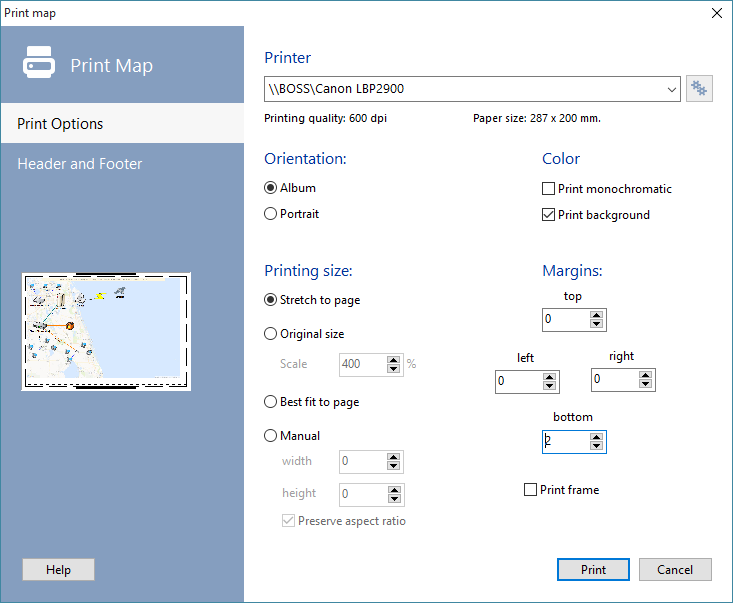
Fig. 1. The Print map window.
Click the Printer settings button and select a printer, configure the paper orientation and printing quality:
- Printer name - If you have several printers connected to your PC, you can select one of them for printing.
- You are able to set the paper orientation if necessary. It is recommended that you use the Album orientation.
- You are able to change the printer settings before printing. Paper size and printing quality (dpi) will be displayed in the appropriate fields.
On the Print diagram window, you can set the following parameters (fig. 1):
- You can set the margins for optimal map layout on paper (displayed as short dotted line in preview window). Hardware margins are also taken into account (displayed as a long dotted line in preview window).
- A frame can be printed around the map.
- Select the Print monichromaric option to print the network diagram in blank and white colors. This can help saving color ink on a color printer.
- Set printing size parameters to define size and position of the printed map on paper. You can:
- stretch the map to page (aspect ratio may be changed)
- use original size, and scale it
- set length and height manually, preserving aspect ratio or not.
- You are able to add your own text labels on the printing: header and footer. You can adjust the style, color, and size of font. Ppostions of the header and footer can be changed too (automatic binding to the map region is available). Use the following keys to add current date, time, and map name to header/footer: %D - current date, %T - current time, %N - diagram name.


 Networking Software Bundles