Alert Properties
 Configuring alerts properties allows setting
the device to be monitored, event type and action to be applied. In the Name field, you can select the device
to be monitored either directly from the list (by selecting name on the map) or by entering the IP-address
or hostname in the field (Fig. 1).
Configuring alerts properties allows setting
the device to be monitored, event type and action to be applied. In the Name field, you can select the device
to be monitored either directly from the list (by selecting name on the map) or by entering the IP-address
or hostname in the field (Fig. 1).
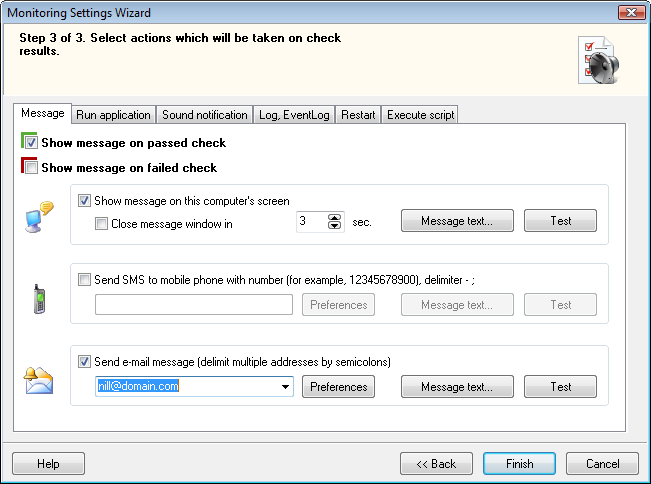
Fig. 1: The Alerts properties window.
In the Event field,
set the select box to desired position.
- Start - triggers when the background ping on selected device does respond.
- Stop - triggers when the background ping on selected device does not respond.
Action - actions, which the program can
execute subsequently when some event triggers.
- Message
Displays predefined text message. You can specify time duration for displaying message window. - Launch
Launches external application, with parameters if necessary. For instance: if you specify the net command as the application (available in Windows NT, 2000, and XP only) and send <computer name> <message text>, you can receive messages from computers that run LANState while you are working on a remote computer. - Sound
Plays specified audio file (WAV). - Log
Saves message text strings to log file, the name of which you can specify in the properties (by default, it is Alert.log in the program's folder.) On the same screen you can view the existing log file as well. - SMS
Can send SMS messages to your cell phone. You should specify the following properties:- Cell phone number in this pattern: <country code><phone number> (for example: 19021235566)
- Message text
- E-mail
Can send e-mail messages to the addresses that you specify. You should specify the following properties:- Destination e-mail address
- Subject
- Message text
Once you have set all properties that are required,
you can test out the alarm's performance by clicking the Test button. All actions that are selected
(marked with the checkmarks) will be executed.


 Networking Software Bundles