Finding Objects on Map
 To run a search, right-click on the map screen
area and then select the Find on map item in the context menu or select the Map | Find on map item on the program's main menu (or press Ctrl+F).
In the window that appears, on the Find by field list, select an object property for searching (name, address, MAC address, signature, etc.), enter a search string, and then click OK. Found hosts will be placed to the list of search results where you can click on a string and move to the corresponding host on the map.
To run a search, right-click on the map screen
area and then select the Find on map item in the context menu or select the Map | Find on map item on the program's main menu (or press Ctrl+F).
In the window that appears, on the Find by field list, select an object property for searching (name, address, MAC address, signature, etc.), enter a search string, and then click OK. Found hosts will be placed to the list of search results where you can click on a string and move to the corresponding host on the map.
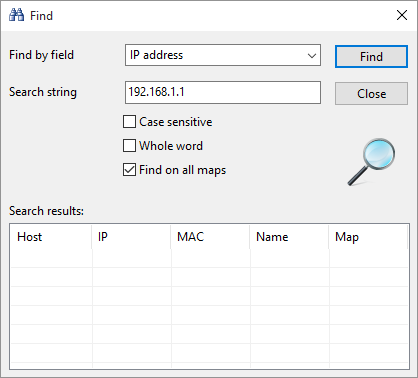
The search is case-insensitive by default. You can change this using the corresponding option.
You can also search by a substring (enter a part of the host name).
When the program starts, it detects users logged on the current map's computers. This allows you to search for computers where a particular user is logged in.


 Networking Software Bundles