Shut Down Remote Computer over Network
 With our program, you can shutdown remote Windows computers over the nework. You need to have the administrator rights
on the remote system for this
(see the section System requirements). The following options
are available to shutdown a Windows PC:
With our program, you can shutdown remote Windows computers over the nework. You need to have the administrator rights
on the remote system for this
(see the section System requirements). The following options
are available to shutdown a Windows PC:
- Shutdown computer; applications with unsaved data will prompt for confirmation on exiting without saving unsaved information
- Shutdown computer and ignore unsaved data (when this option is enabled)
- Restart computer (when the Reboot option is enabled)
- Cancel shutdown. This option is possible if the Delay time parameter is greater than 0 seconds. When the time is up, you will not be able to Cancel operation using the corresponding button.
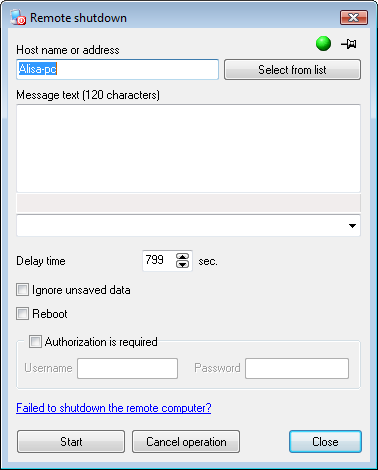
Fig. 1: The Remote shutdown window.
You can shutdown several computers simultaneously. Specify their names in the field Computer name separated by semicolons, or click Select computers and select necessary PCs in the Network tree window. Then click Start and watch the results.
If the current user does not have the administrator rights on the remote computer, you will need to provide the remote administrator's credentials in order to complete the restart and shutdown operations successfully. To do that, please select the Authorization is required box and fill in the Username and Password fields.
Before shutting a system down, the message (Fig. 2)
notifying a user about the upcoming shutdown and the time left will be displayed on the remote computer's screen.
You can also add any text to the shutdown message (in the Message text field, Fig. 1).
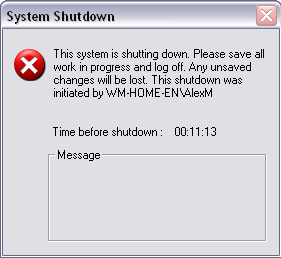
Fig. 2: Message on shutting down remote computer.


 Networking Software Bundles