Services and devices
 The program allows getting
the list of services and devices from a remote computer. You can display services of necessary types by selecting the type
you need in the Type drop-down list (Fig. 1). Also you can display active/inactive services
(using drop-down list State).
The program allows getting
the list of services and devices from a remote computer. You can display services of necessary types by selecting the type
you need in the Type drop-down list (Fig. 1). Also you can display active/inactive services
(using drop-down list State).
If the program cannot get the remote service list (and you have all necessary rights for this), please read this solution in our FAQ: The program cannot get the list of running services, processes, and installed software from a remote PC.
If you have the domain administrator privileges, you can start, stop, pause, or restart services on the remote computer. These operations require administrator rights on remote computers. If the current user does not have such rights, you can connect to the remote computer using administrator's credentials. Read here how to do this.
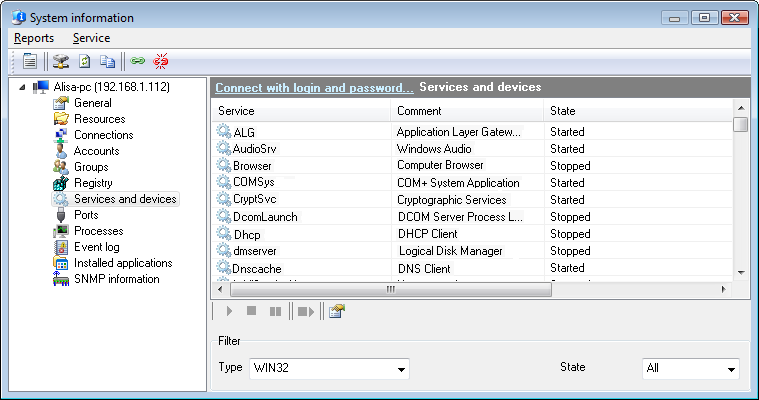
Fig 1. The Remote services and devices window.
You can copy the data you have retrieved
to the clipboard and then paste it to any text file or Microsoft Excel sheet. To do that, right-click on the service list
and then select Copy to clipboard on the menu that appears.
You can watch additional information on the listed services. To do that, click the Properties menu item in the context menu. The "Service Properties" window will be displayed (Fig. 2). It shows the service file path, dependent services, the startup type, and the current state of the service. If you have administrator rights on that remote computer, you can edit the startup type of the service.
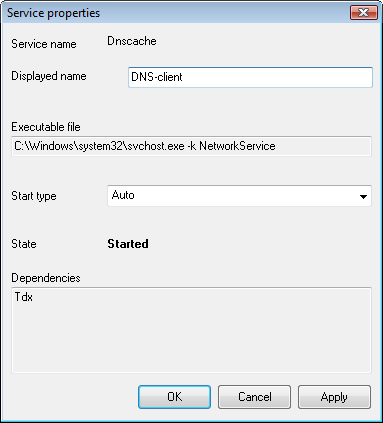
Fig 2. The Remote service window.


 Networking Software Bundles